Point by point: what was asked, what changed for the client, and screenshots of the portal before and after.
15 of the 18 points are done. Two were taken out of scope by agreement (11, uploading a mileage log, and 15, the HMRC Income Viewer), and one was moved to a later round (18, TSB).
Point 6, the terms and the HMRC 64-8, now has ZippTax's final terms and agent details. Following Nino's advice, signing also proves who signed: the client types their name and enters a code emailed to them at that moment. One thing is still needed from ZippTax: a document-signing certificate, so the signed PDFs carry ZippTax's digital seal.
Two features that were not on the list were also added: salespeople can follow their own clients' progress, and there is a new Accountants staff group. Nino's two corrections to the mileage calculation are also done: 25p a mile after the first 10,000 miles, and choosing how the client travels to each place.
All of it is now on the live site, portal.zipp.tax. On 15 October it was checked there end to end with a made-up test client: invited by a salesperson, one tax year completed and signed with the report emailed, and the bookkeeper run on a second year. An accountant's access was checked the same way.
How to read this report. Each point starts on a new page. Where a point changes what the client sees, the screenshots are the client's own screens, emails and report, shown as Before and After. Before is the portal as it was before the change; After is the portal as it is now. Both use the same made-up client, so the two can be compared directly. Screens that only staff see are marked Staff.
Click any screenshot to see it full size.
Date: 15 October 2026 · Prepared by: Sam Ghosh
Screenshots were taken on test copies of the portal and, for point 1, on the live portal, always with made-up clients. No real client data is shown.
The bookkeeper asks only about the year being claimed
✓ Done
What was asked
"Questions by AI bot always seem to ask about the wrong year than the one being done. So if doing year 24/25, AI bot will ask about transaction from 2026."
What changed for the client
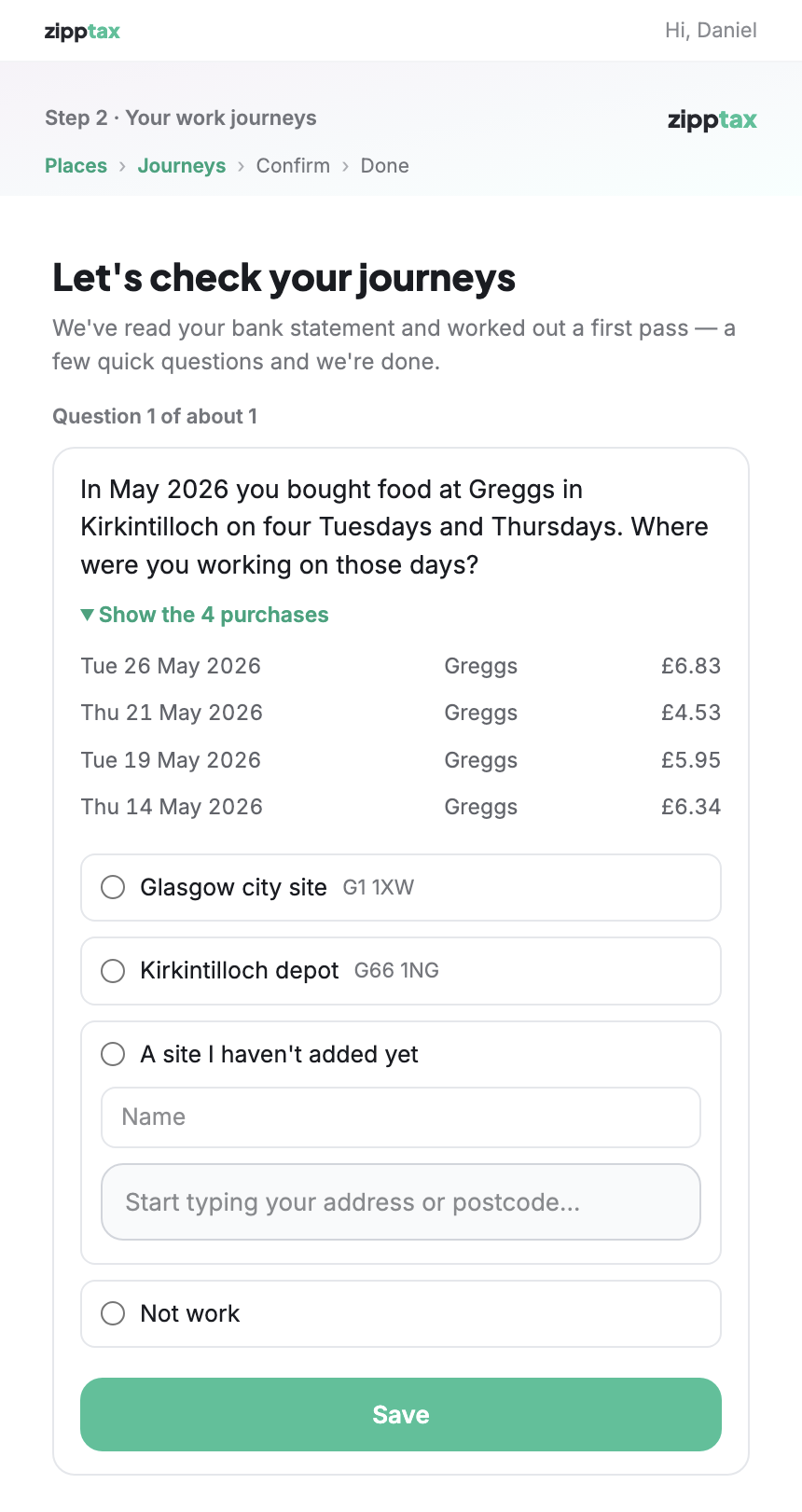
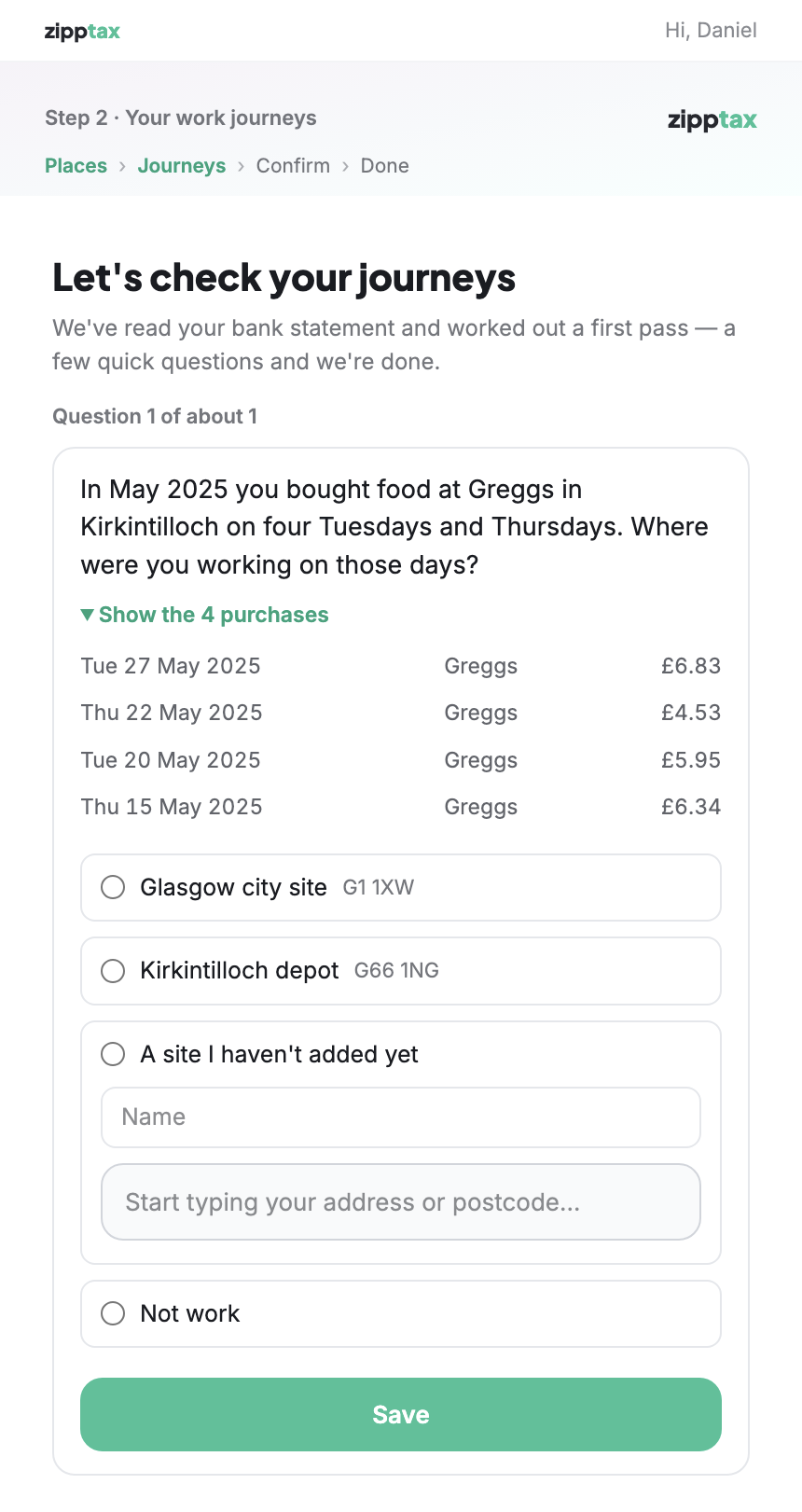
The bank sends up to five years of statements, and the bookkeeper (the AI that reads the statements and asks the client questions) used to see all of them. Now it only sees the year being claimed, 6 April to 5 April, and is told to ask only about that year. As a second safeguard, the portal refuses any question whose dates fall outside that year.
Below, a client is working on their 2025/26 claim, which covers 6 April 2025 to 5 April 2026.
Before The question is about purchases in May 2026, after the claim year has ended.After The same kind of question, now about May 2025, inside the claim year.
How these two screenshots were made: the questions were set up by hand with made-up bank data to show exactly what the client sees. The bookkeeper itself was not run for these screenshots. Everything else on the screens is the real portal. The next page shows the bookkeeper itself, running on the live site.
Schedule 1 · Point 1 of 18 · continued
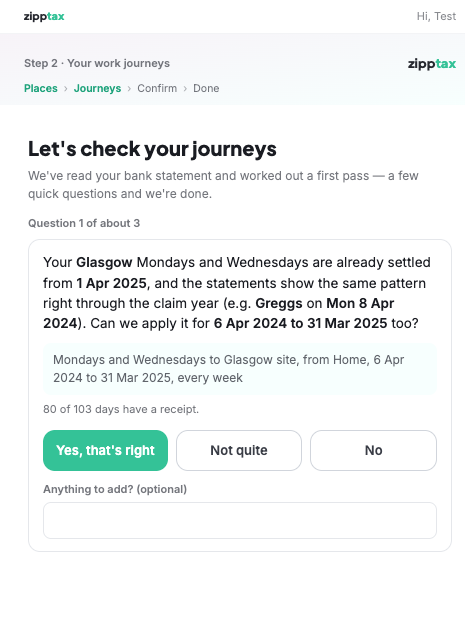
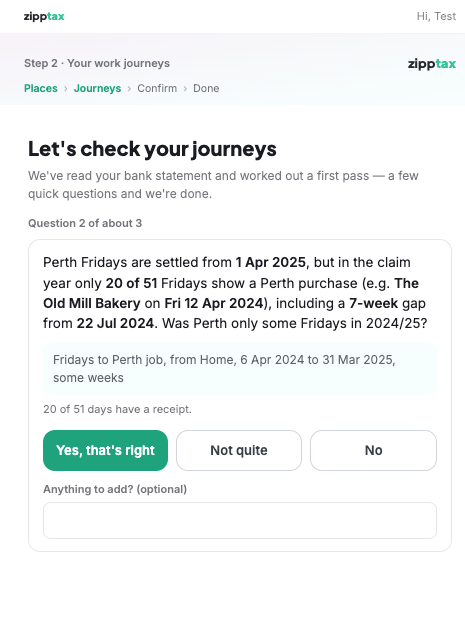
Checked on the live site
On 15 October a made-up test client on the live portal worked through a 2024/25 claim, which covers 6 April 2024 to 5 April 2025. Their test bank data runs from October 2021 to October 2026. The bookkeeper read it and asked three questions, all about dates inside 2024/25.
After Question 1: Glasgow on Mondays and Wednesdays, "6 Apr 2024 to 31 Mar 2025", with a purchase on Mon 8 Apr 2024 as the example.After Question 2: Perth on Fridays, only some weeks, with a 7-week gap from 22 July 2024.
Schedule 1 · Point 2 of 18
Likely refund for each year, and a running total
✓ Done
What was asked
"On the home screen where you go through doing each year, having gamification of the years and how much money you will likely back to give people incentive to carry on and do the following year."
What changed for the client
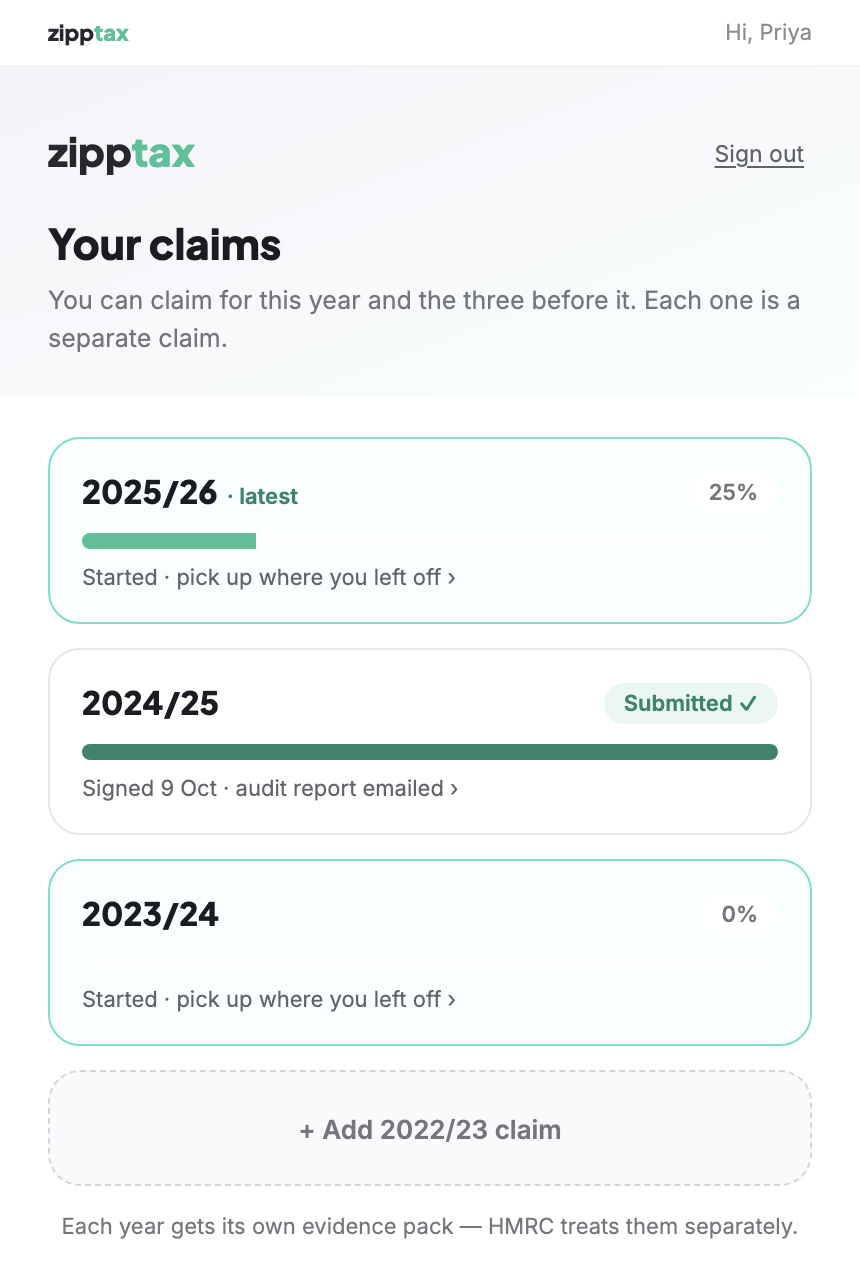
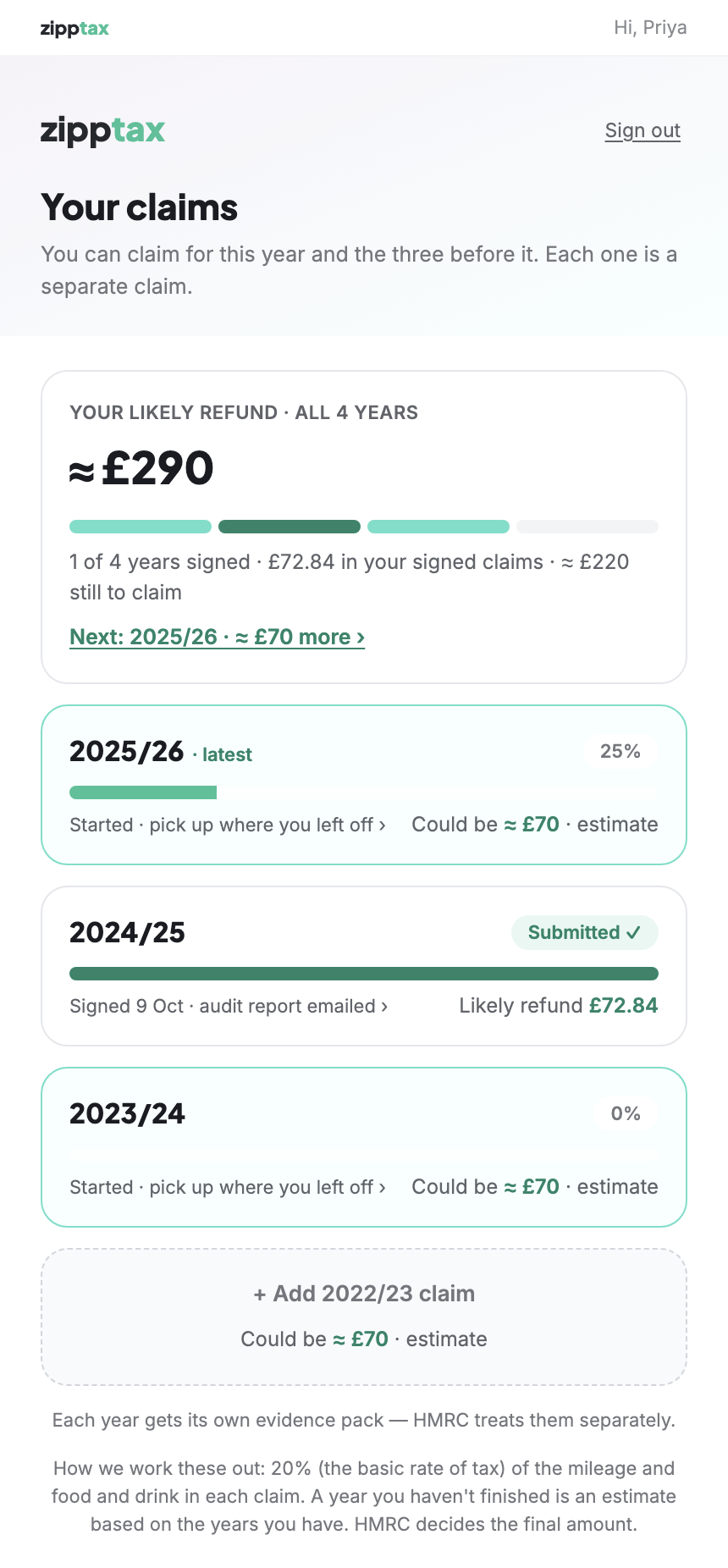
The claims screen now shows, for every year, how much the client is likely to get back, with a total for all four years at the top and a progress bar. A year they have not finished shows an estimate based on the years they have done, to encourage them to carry on.
The figure is the basic rate of tax (20%) on the mileage and food and drink in each claim. A note under the list says HMRC decides the final amount.
Before Each year shows only how far through it the client is. No money figures.After "Your likely refund · all 4 years ≈ £290" at the top, the signed year's figure (£72.84), and "Could be ≈ £70" on each unfinished year.
To decide later: everyone is assumed to pay basic-rate tax, so a higher-rate taxpayer will get back more than shown.
Schedule 1 · Point 3 of 18
Food and drink places ticked from the start
✓ Done
What was asked
"Bank Statement when it asks about which food places are for work or not have them all highlighted initially and then customer can deselect rather than select them."
What changed for the client
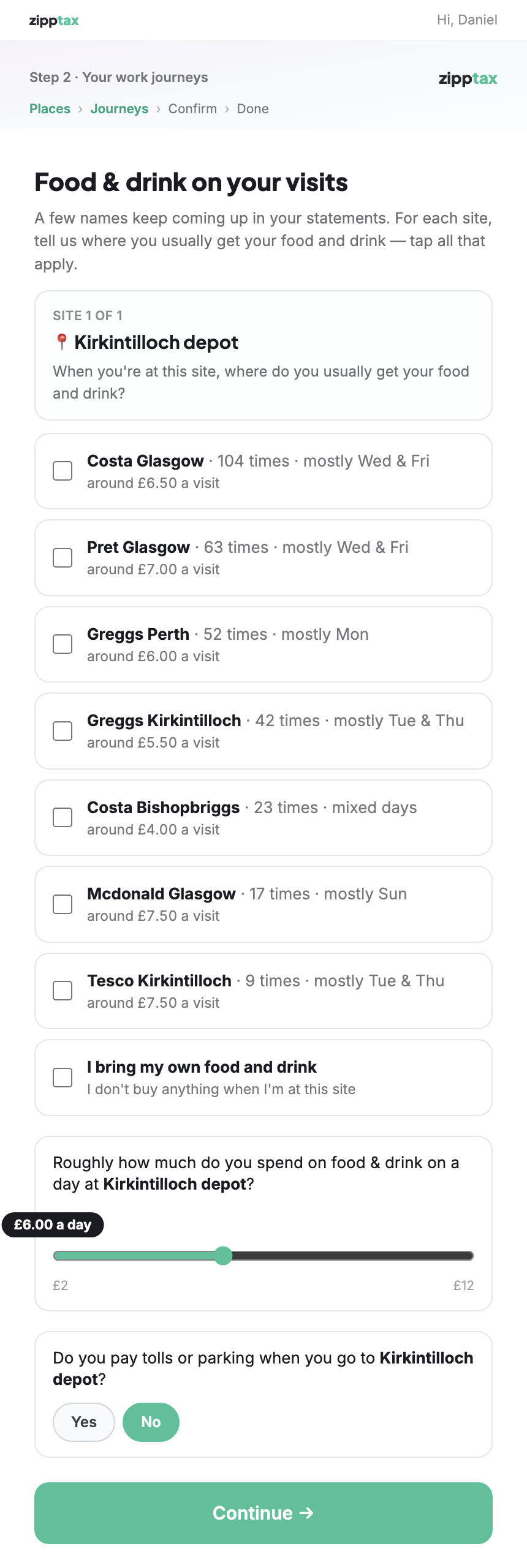
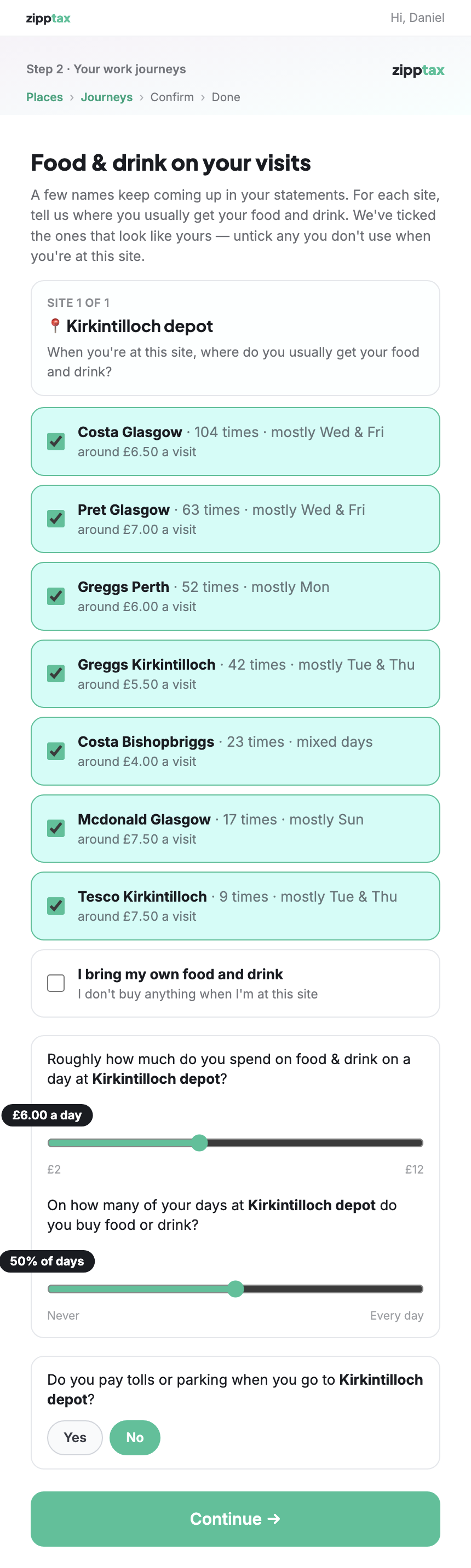
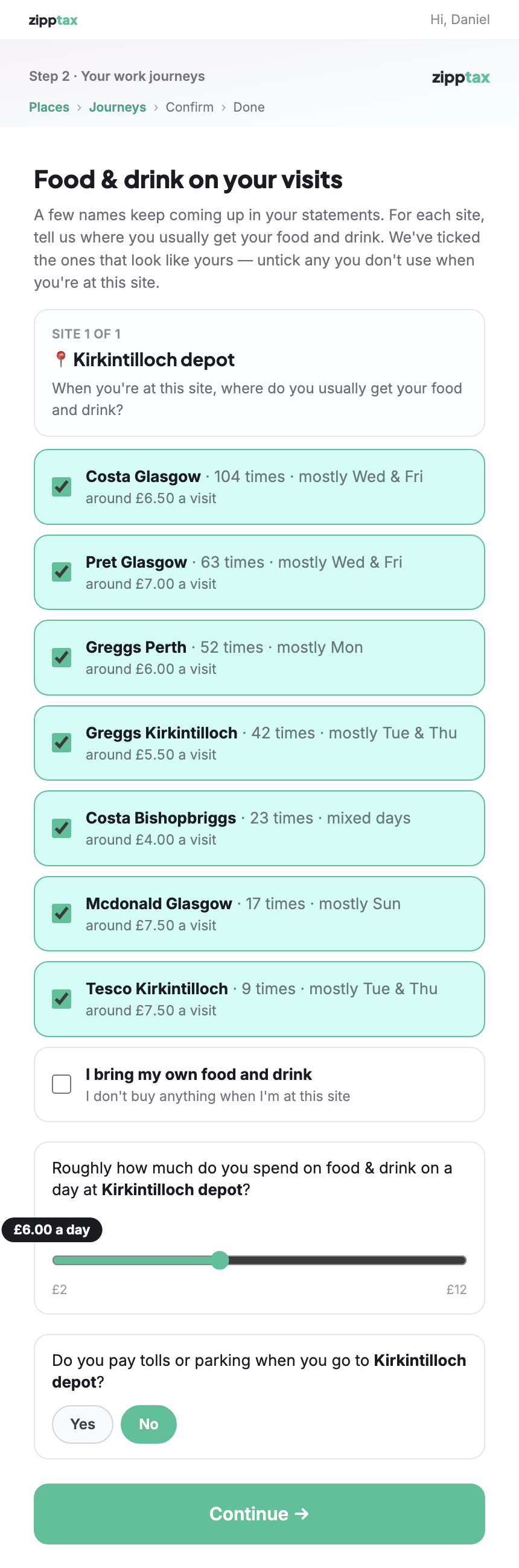
When the client is asked where they usually buy food and drink near a work site, every place found in their statements now starts ticked. The client unticks any they don't use, instead of ticking each one they do.
Before All seven places start unticked: "tap all that apply".After All seven start ticked: "We've ticked the ones that look like yours — untick any you don't use".
Schedule 1 · Point 4 of 18
Self Assessment question explained for PAYE workers
✓ Done · wording approved by Jim
What was asked
"Step 3 – 'ever done a tax return / SA before?' clarify that if you are PAYE then it is unlikely you will have done this before."
What changed for the client
The question now has an explanation underneath: someone employed and taxed through PAYE probably hasn't filed one, and would normally only have done so if they earned over £100,000, rented out a property, were self-employed, or HMRC wrote to ask them. If they are not sure, they answer No. Jim approved this wording.
Before Only "Which tax years? We'll ask for the SA100 form for each."After "If you're employed and your tax is taken through PAYE, you probably haven't…"
Schedule 1 · Point 5 of 18
Invite a client by name and email
✓ Done
What was asked
"Portal system so that we can upload a name and email address and then the portal system will automatically send them the link with a briefing in the email sent."
What changed for the client
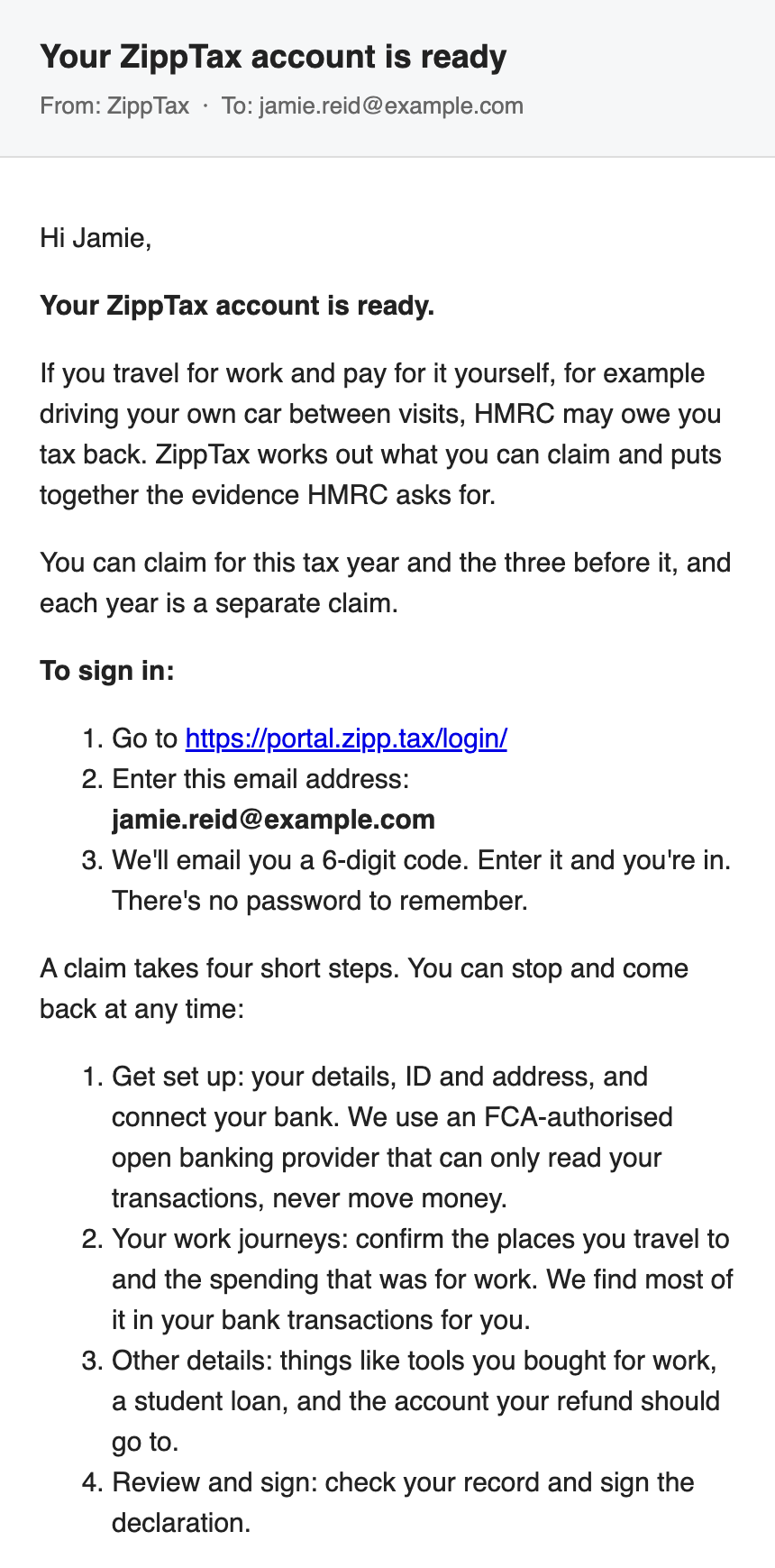
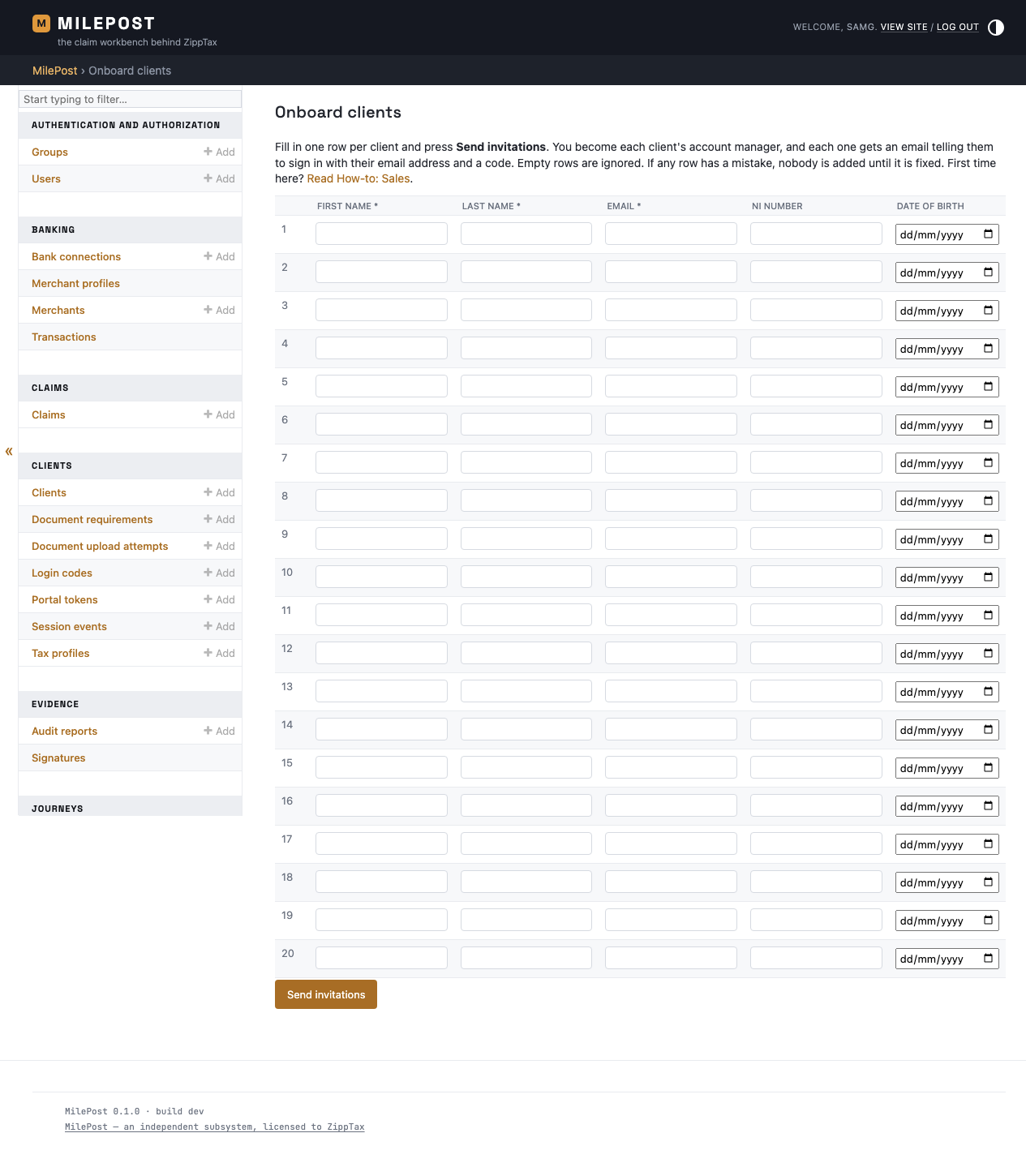
A salesperson enters the client's name and email address, and the client receives an email that explains what ZippTax does, how to sign in, and the four steps of a claim. This is new, so there is no "before" screen: before, there was no invitation email.
After The email the client receives, "Your ZippTax account is ready", shown here in a plain mail window.
Staff Where the salesperson types the details: "Onboard clients" in MilePost, up to twenty clients at once. The salesperson who sends the invitation becomes that client's account manager.
Schedule 1 · Point 6 of 18
Terms signed in the portal, and the HMRC 64-8 filled in
✓ Done
What was asked
"New Ts and Cs built in to the system so that this can be signed through the web app not a separate PandaDoc etc. Self populates the 64-8. Could have this on the last page like on ZippCar. Tick box to confirm have read and understood."
What changed for the client
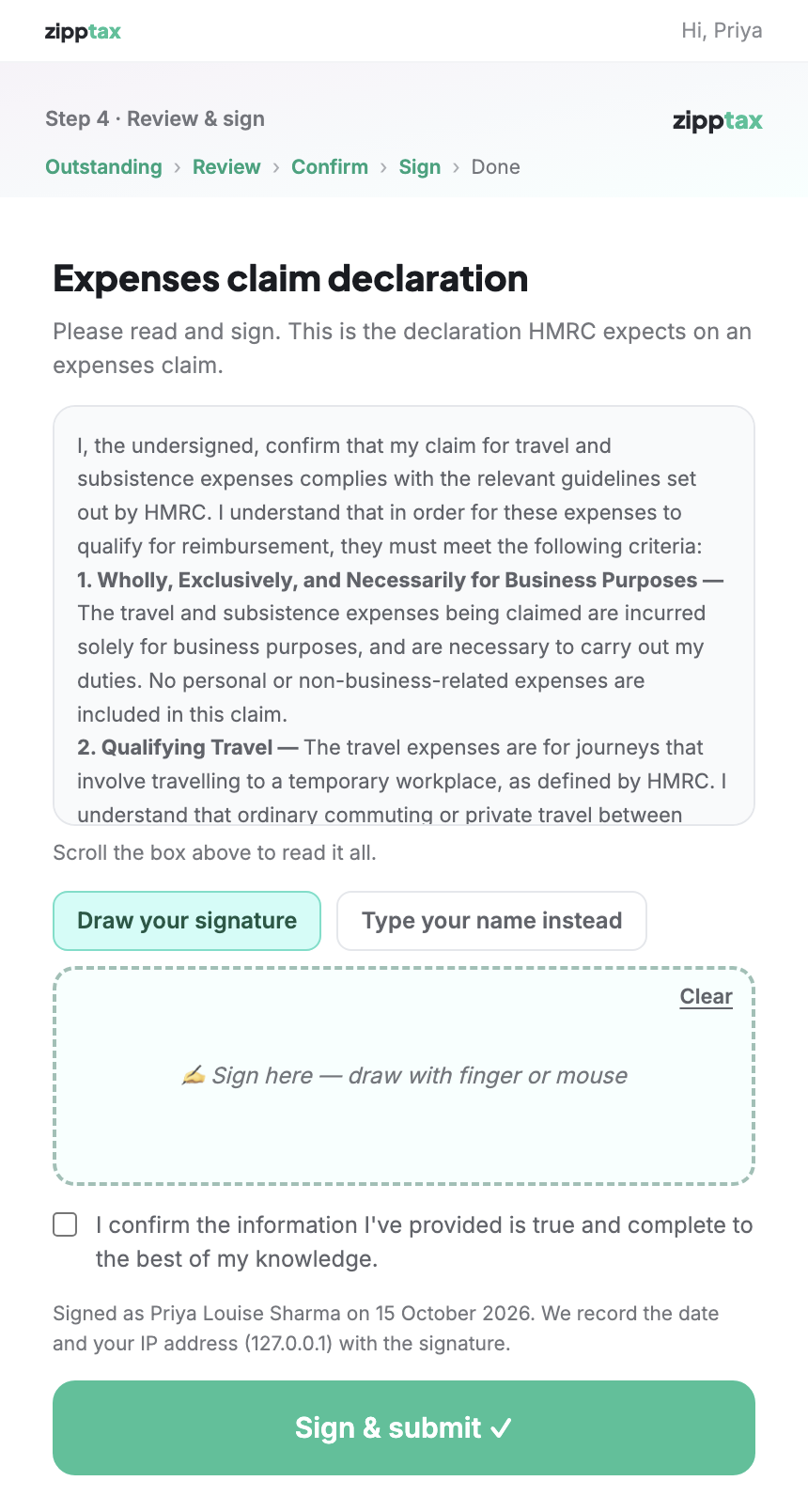
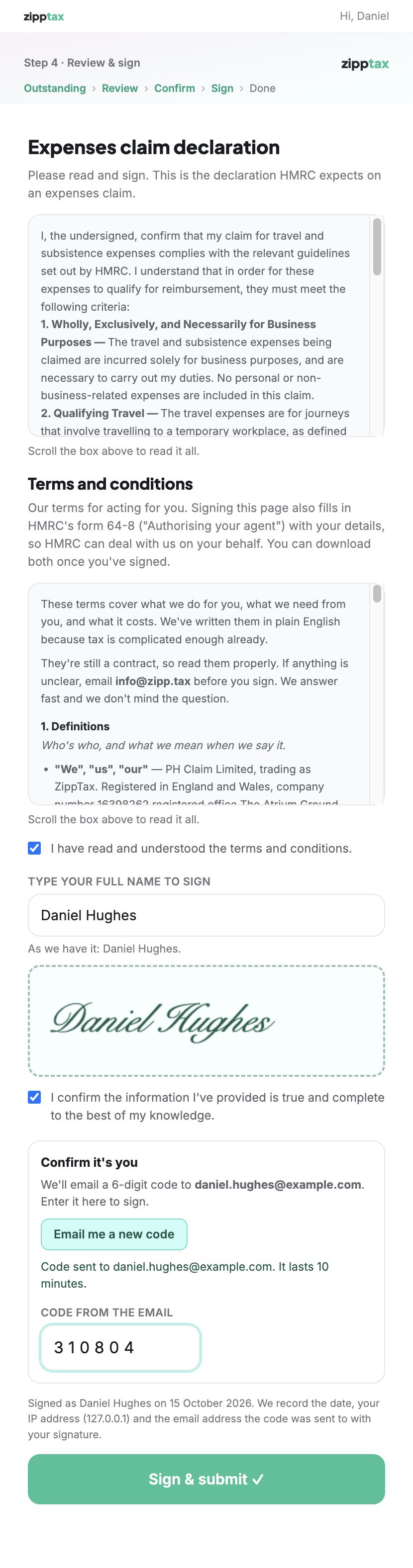
The last page of a claim, where the client signs, now also shows ZippTax's terms (the final version, dated 15 October 2026) with an "I have read and understood" tick box. The client signs by typing their full name, which is shown in a handwritten style. To confirm it is really them, they press "Email me a code" and enter the 6-digit code from the email. One signature covers both the declaration and the terms. The client can then download two PDFs: the terms they signed, and HMRC's own 64-8 form filled in with their details, ZippTax's agent details and their signature.
Proving who signed
Nino advised that what matters to HMRC is being able to prove the right person signed; typed or drawn makes no difference. ZippTax preferred a typed, time-stamped signature, as with DocuSign and PandaDoc. So the portal now:
checks the typed name matches the name ZippTax holds for the client (if the name held is wrong, the client cannot sign until staff correct it);
emails a fresh one-time code at the moment of signing, so only someone with access to the client's email can sign;
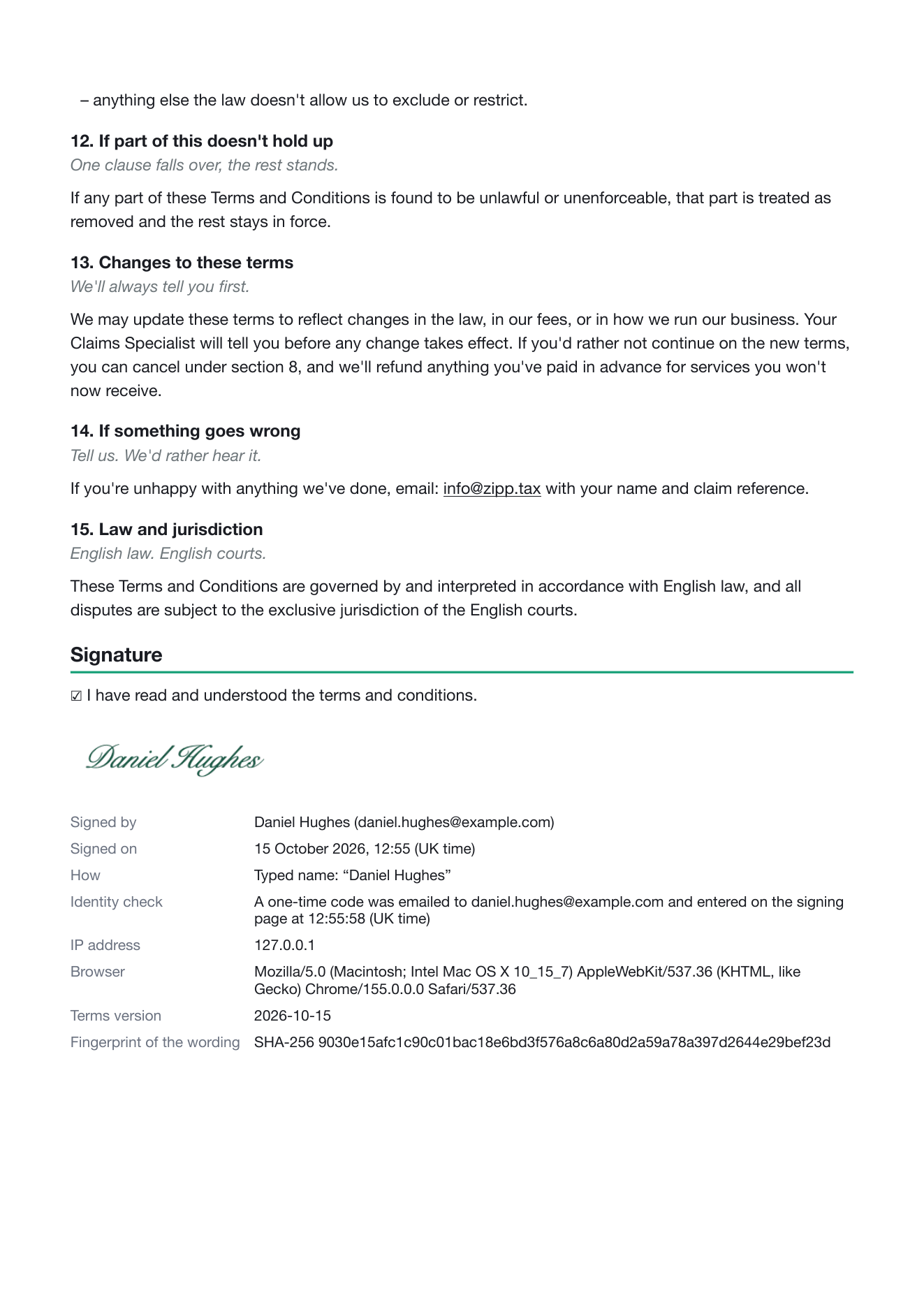
prints the email address the code went to, and the time it was entered, on the signed terms and the audit report;
keeps a fingerprint of every signed PDF, so any later change to a copy can be detected.
Still needed from ZippTax: a document-signing certificate, bought from a certificate provider. Once it is added, every signed PDF also carries ZippTax's digital seal, which a PDF reader shows as "signed by ZippTax, unchanged since". Until then the documents are fingerprinted but not sealed. The agent's phone number box on the 64-8 is left blank, as agreed.
Before The sign page had only the expenses declaration.After Look for the terms with the "I have read and understood" tick box, the typed name shown as a signature, and "Confirm it's you" with the emailed code.
Schedule 1 · Point 6 of 18 · continued
What the client gets after signing
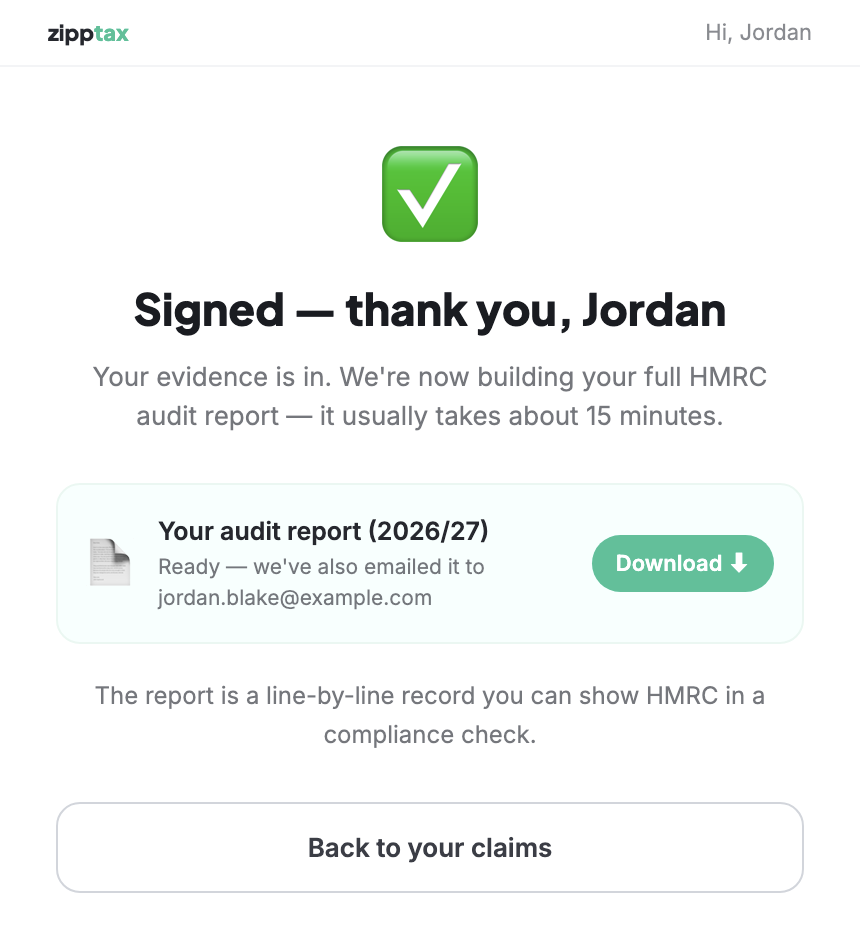
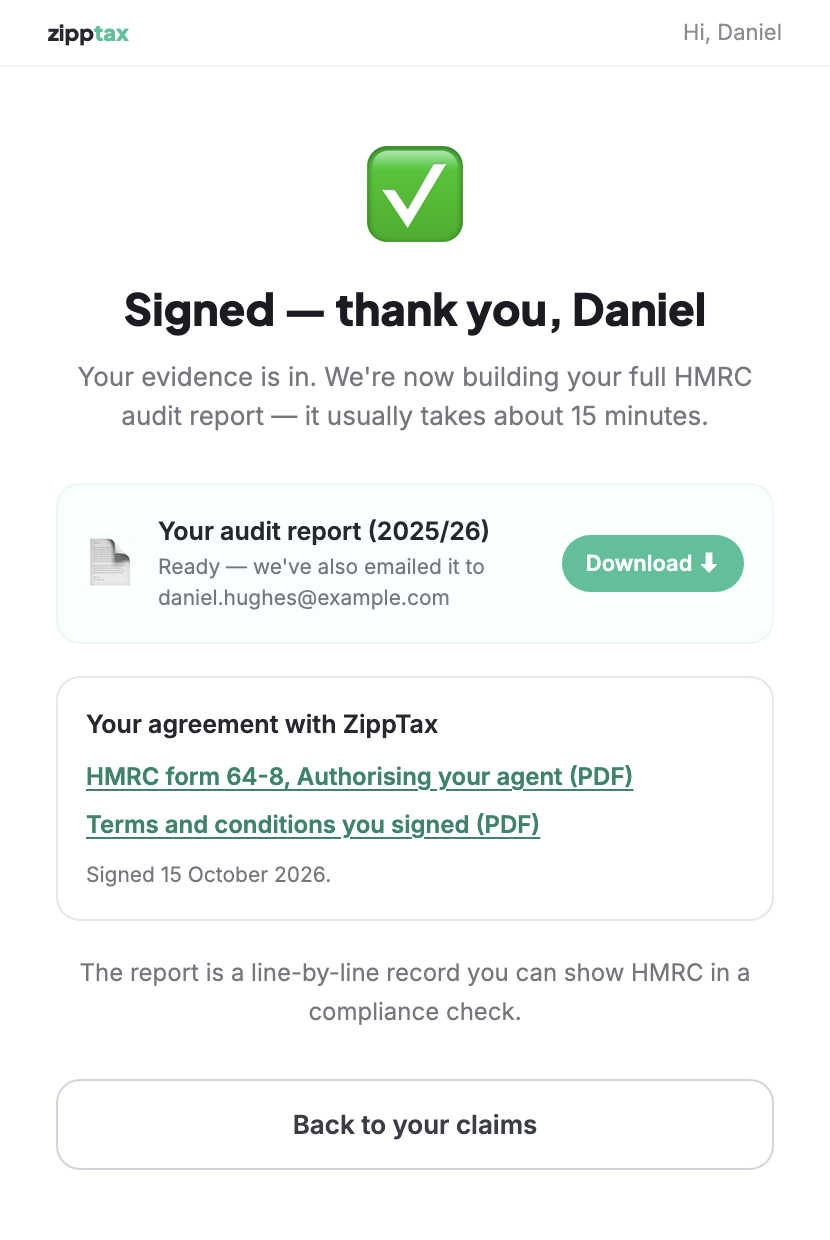
Before The "Signed — thank you" page had the audit report only.After A new box, "Your agreement with ZippTax", with the signed 64-8 and the signed terms.
Schedule 1 · Point 6 of 18 · continued
The two PDFs the client downloads
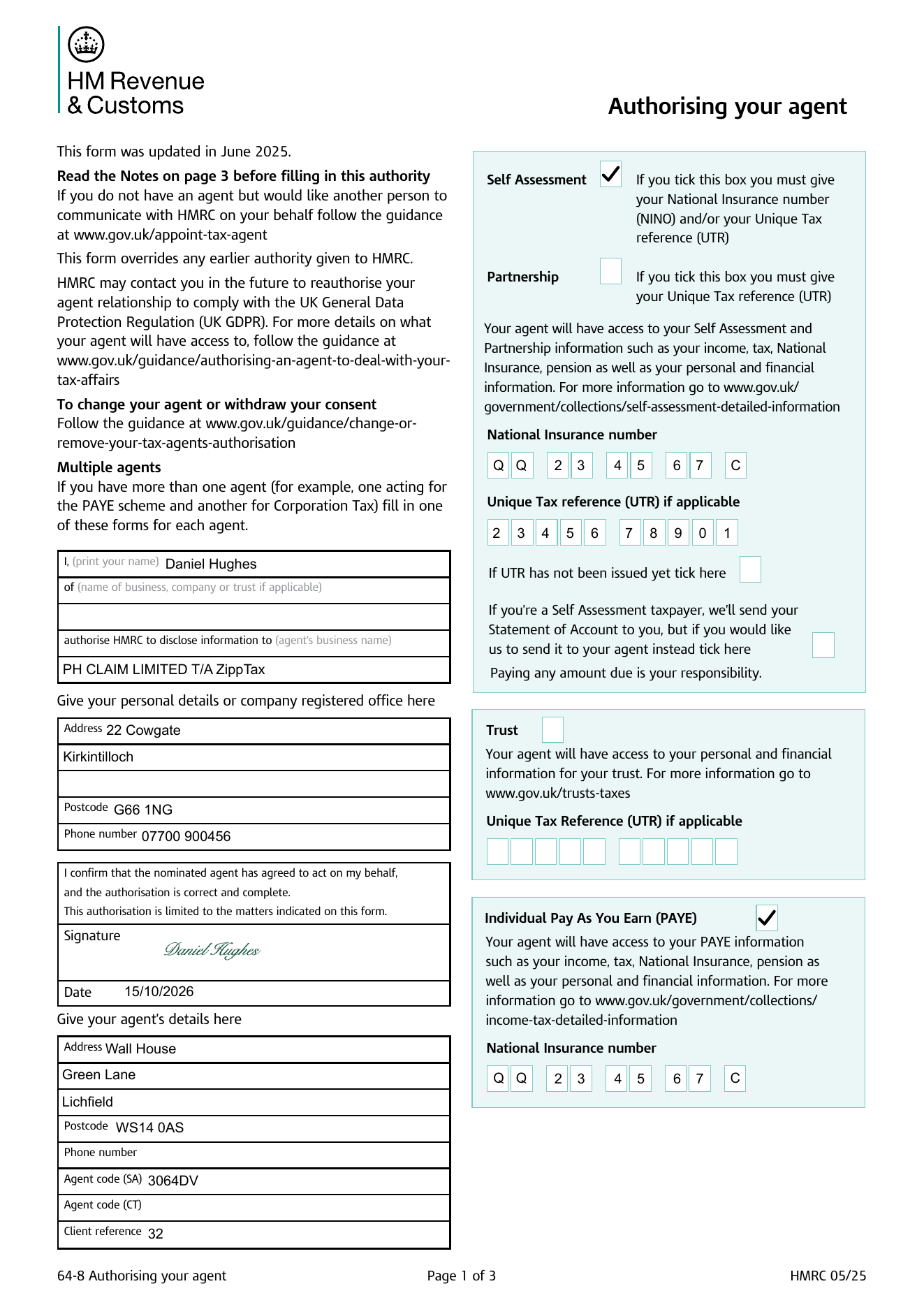
After Page 1 of HMRC's official 64-8, filled in with the client's details, signature and date, and ZippTax's agent details (the phone number box is left blank, as agreed).After The end of the signed terms: who signed and when, the emailed-code check, and which version of the terms.
Staff The same documents on the client's page in MilePost: which terms were signed, when, and links to both PDFs.
Schedule 1 · Point 7 of 18
Student loan: ask for the plan only
✓ Done
What was asked
"Remove the Student loan amounts; we only need to know the Plan Type."
What changed for the client
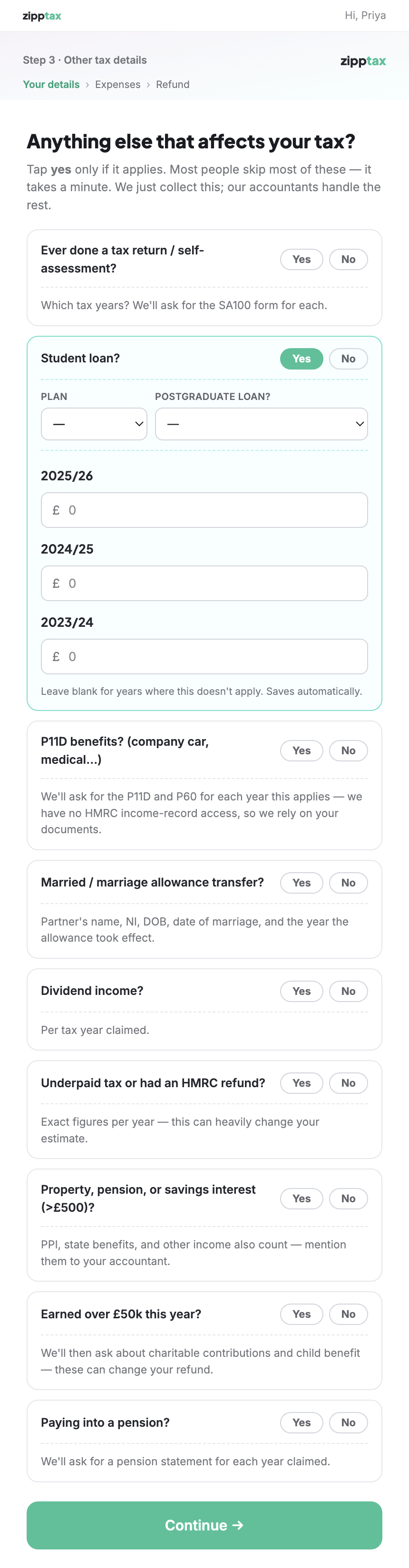
The student loan question now asks only for the plan and whether there is a postgraduate loan. The boxes for the amount repaid each year are gone. Answers clients gave before the change are kept.
Before The plan, then an amount box for each of 2025/26, 2024/25 and 2023/24.After Just the plan (Plan 2) and the postgraduate loan question. No amounts.
Schedule 1 · Point 8 of 18
Link to HMRC's approved professional bodies
✓ Done
What was asked
"Link to approved bodies under other things you bought for work, to explain what they can actually claim for."
What changed for the client
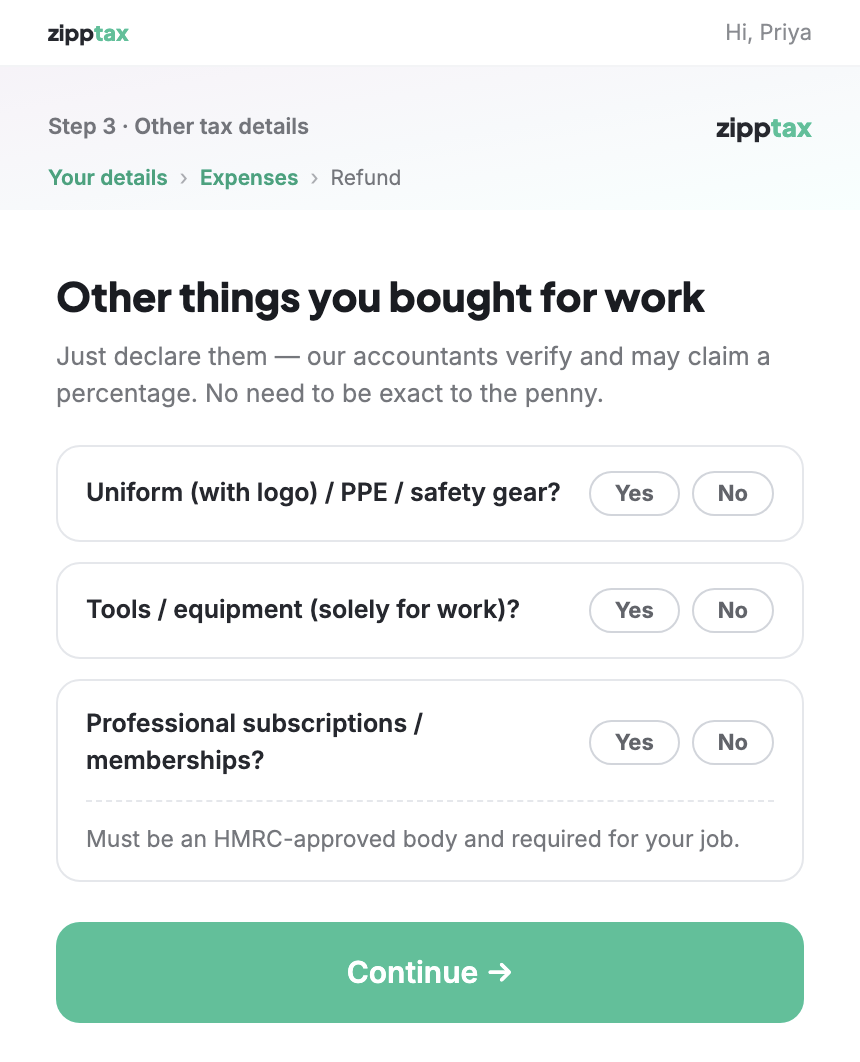
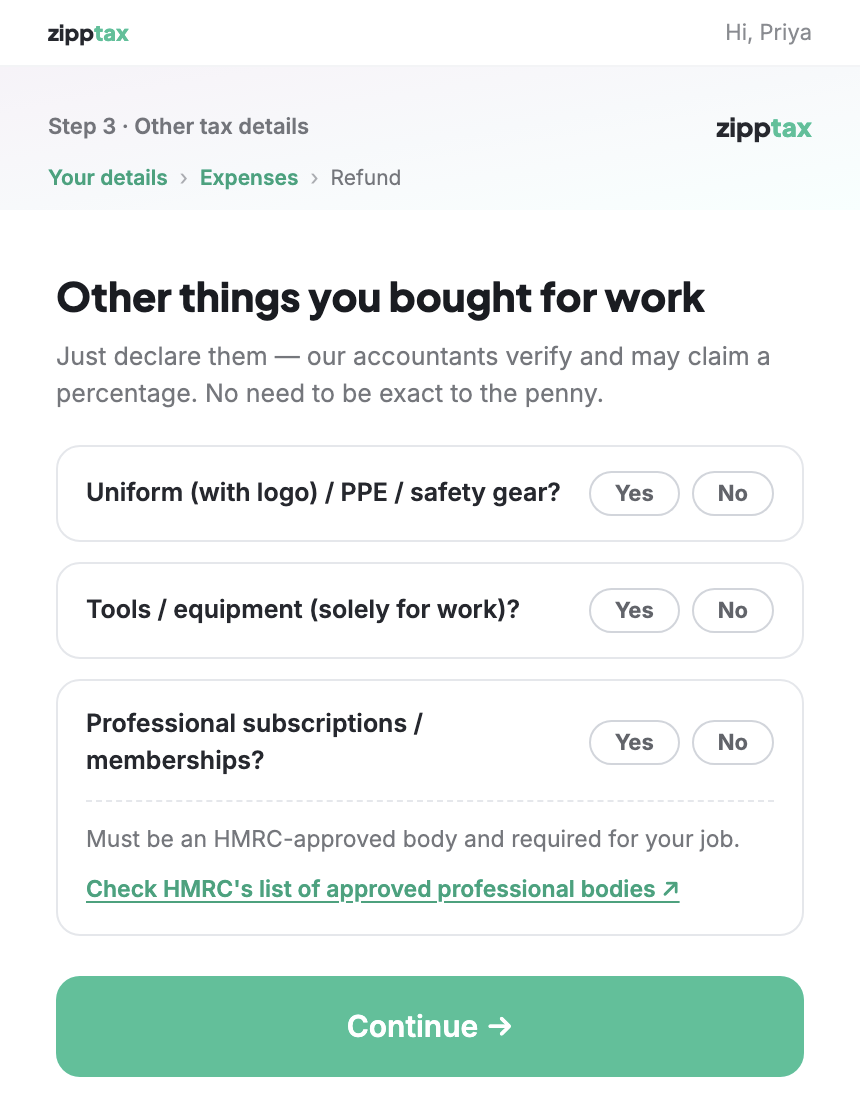
Under "Professional subscriptions / memberships", the client now reads that the body must be HMRC-approved and required for their job, with a link to HMRC's list of approved professional bodies on gov.uk.
Before "Must be an HMRC-approved body and required for your job." No link.After "Check HMRC's list of approved professional bodies ↗" under the question.
Schedule 1 · Point 9 of 18
Employer mileage rate that changed during the year
✓ Done
What was asked
"If their job has changed during a tax year and they get a different amount of reimbursement from their new employer then this needs to be factored in. On the slider for how much were you reimbursed it asks was this the case for the whole time you are claiming for; if they say no then they can select how much they were reimbursed for that."
What changed for the client
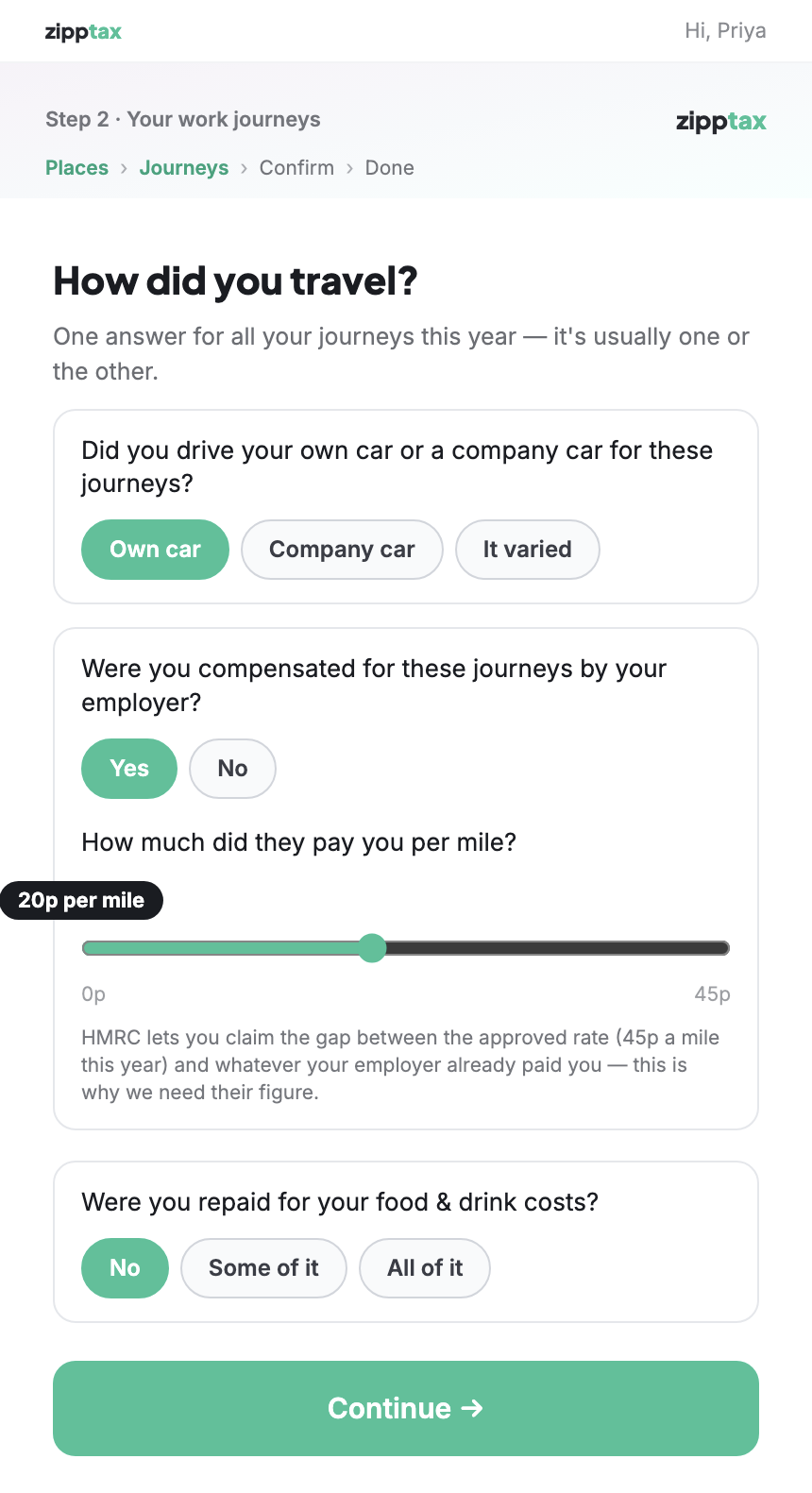
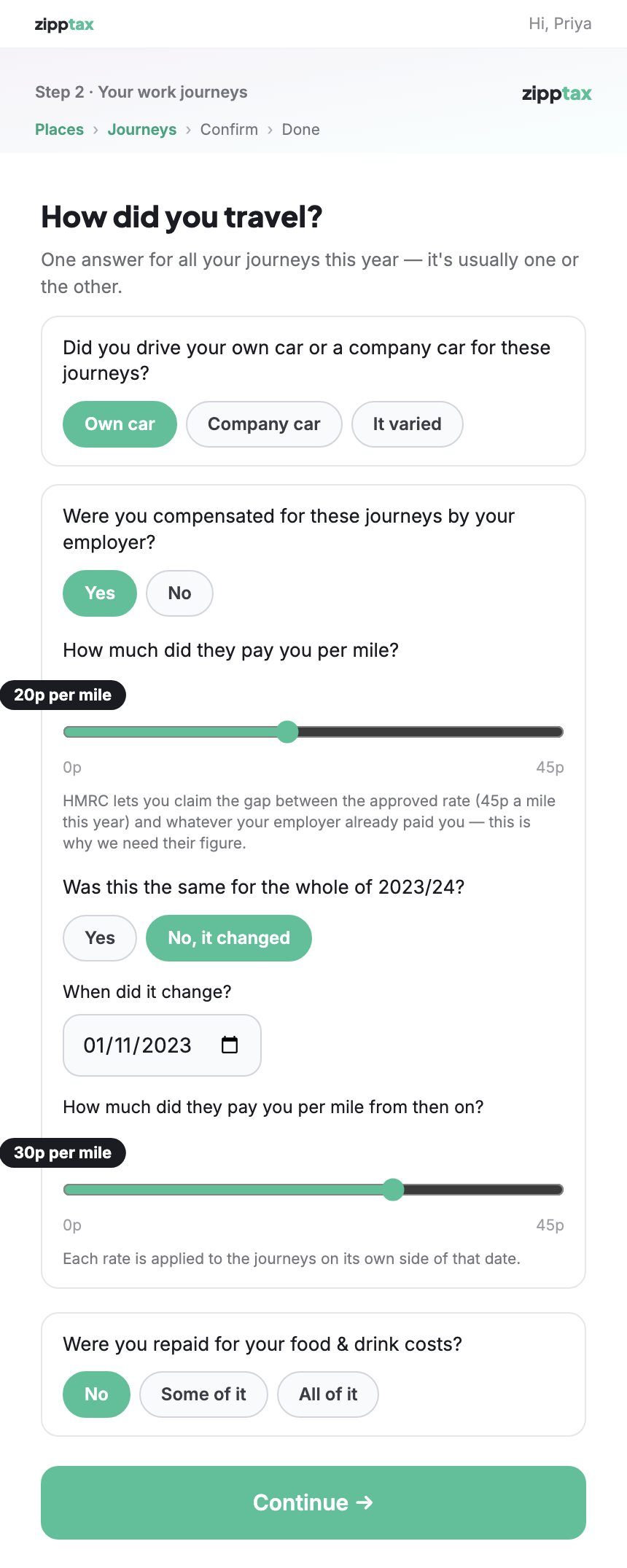
After the client says how much their employer paid per mile, they are asked "Was this the same for the whole of the year?" If they answer "No, it changed", they give the date it changed and the new rate. Each rate is applied only to the journeys on its side of that date.
Before One rate, 20p a mile, for the whole year.After 20p a mile, then "No, it changed" on 1 November 2023, and 30p a mile from then on.
Schedule 1 · Point 9 of 18 · continued
How the change shows on the client's audit report
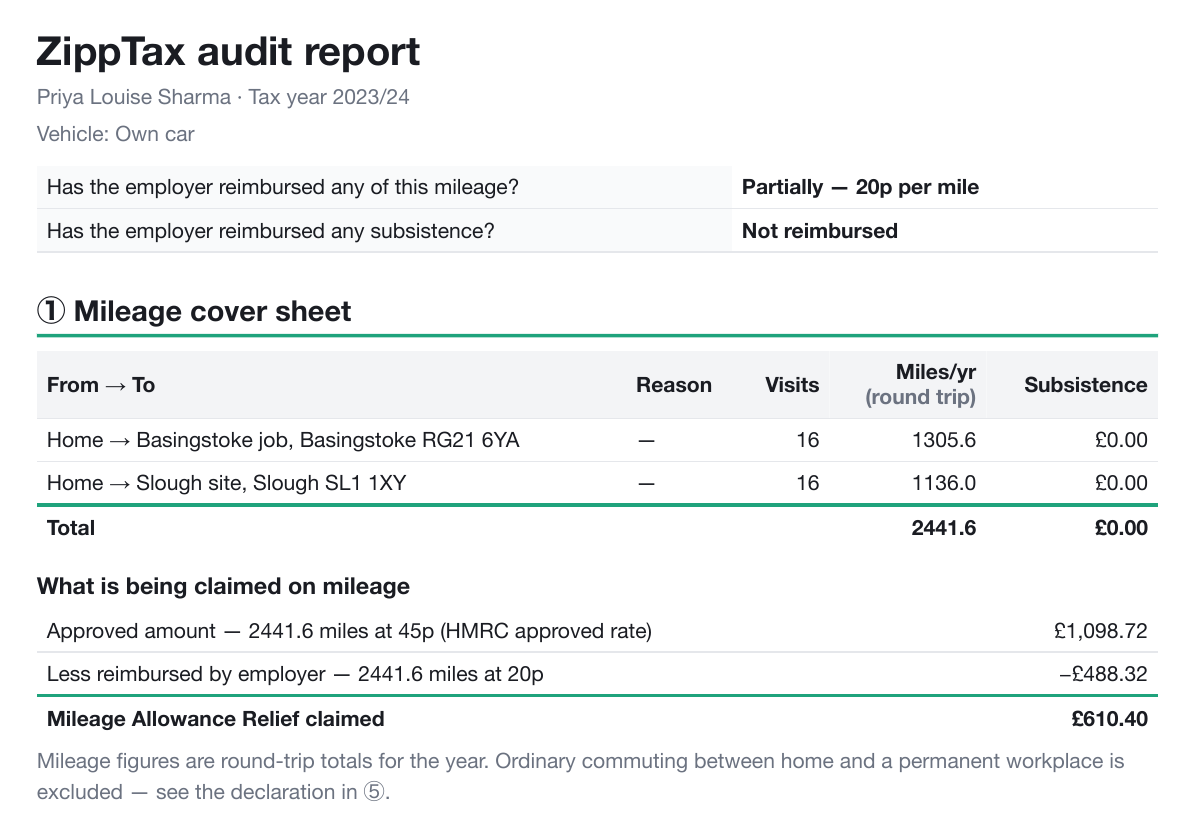
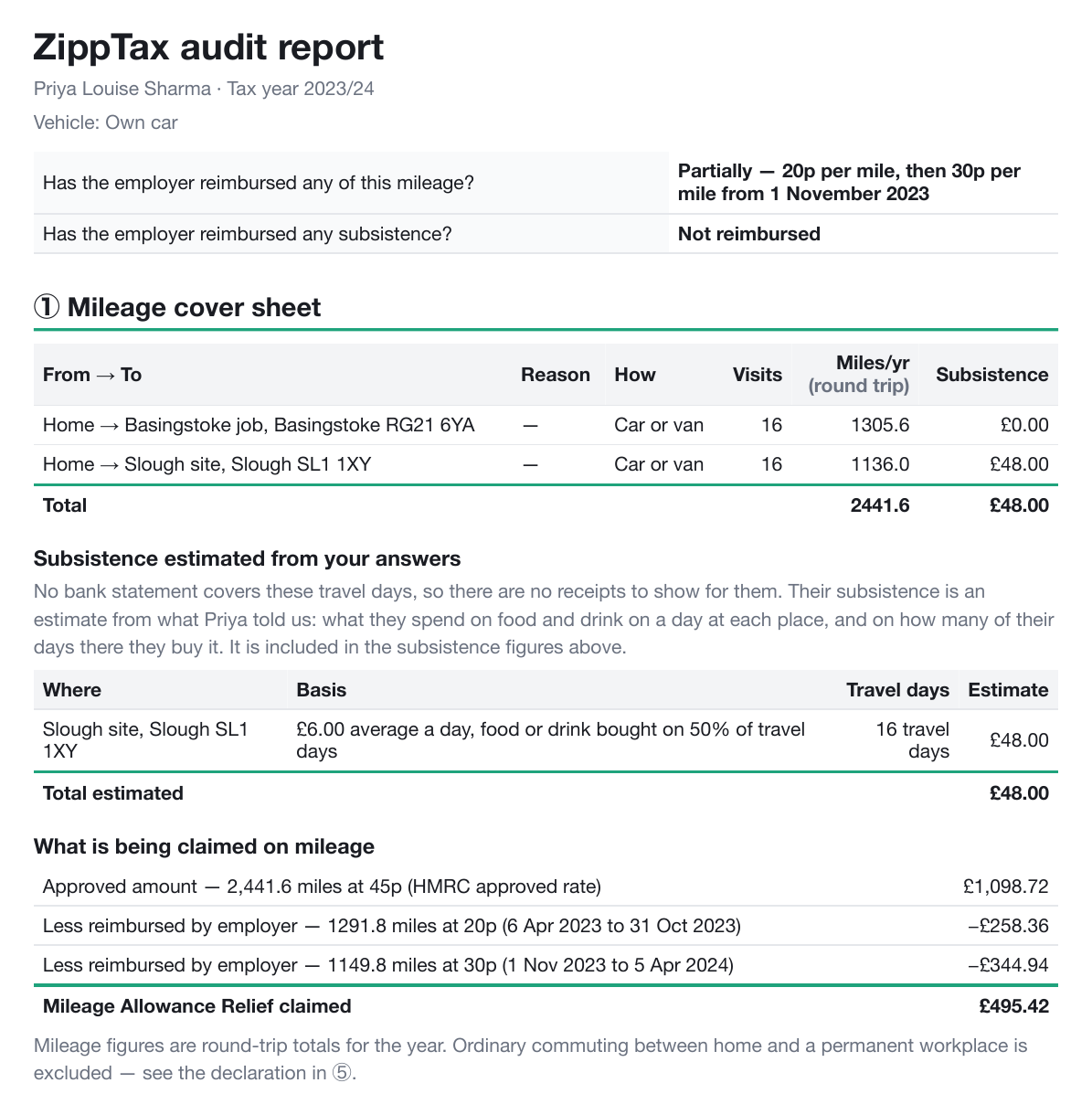
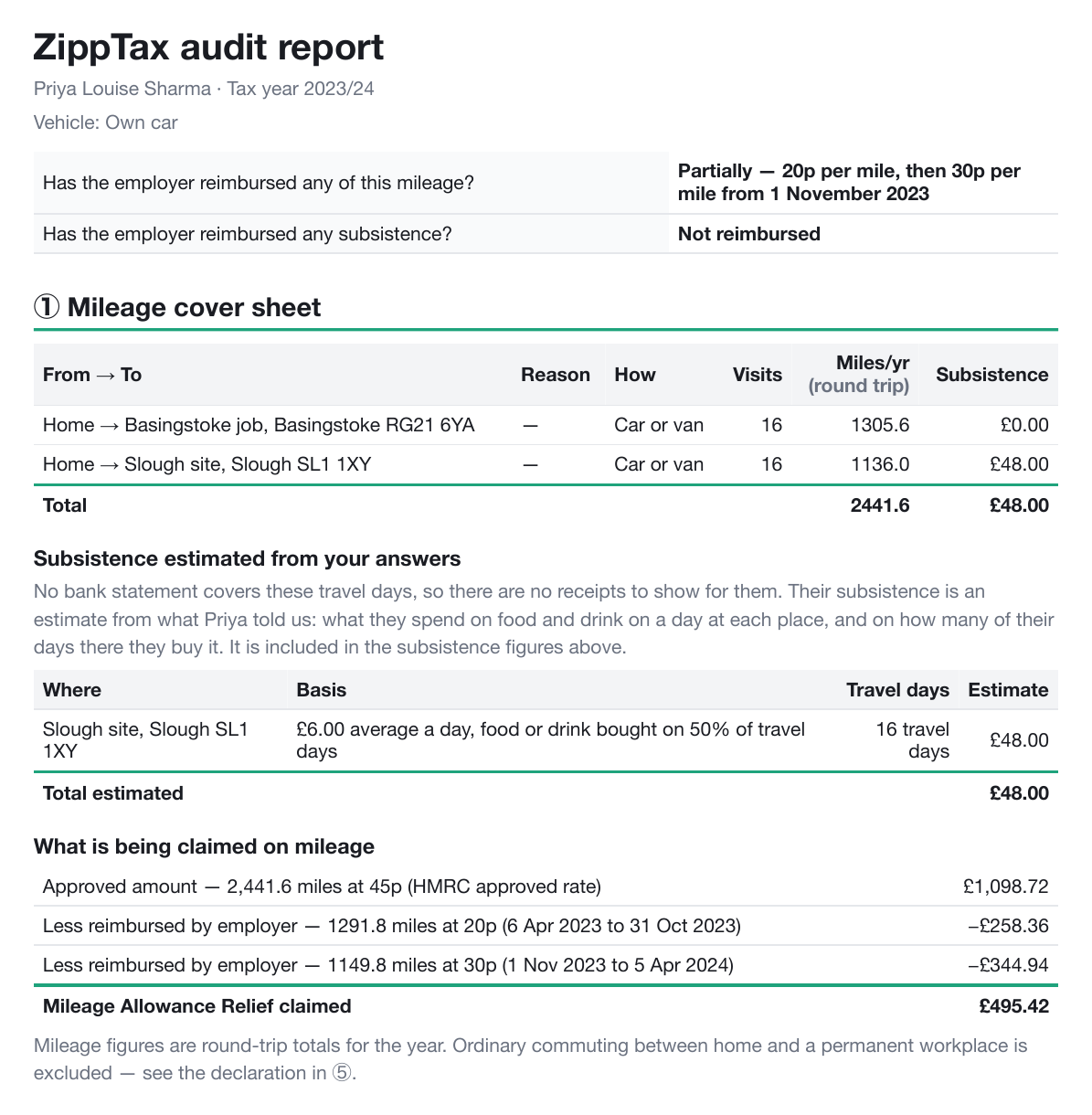
Before Look at "What is being claimed on mileage": one line, "2441.6 miles at 20p".After Two lines: "1291.8 miles at 20p (6 Apr 2023 to 31 Oct 2023)" and "1149.8 miles at 30p (1 Nov 2023 to 5 Apr 2024)". The top of the report also says when the rate changed.
Schedule 1 · Point 10 of 18
Report still emailed if the client leaves the page
✓ Done
What was asked
"If they leave the loading screen when generating report will it still do the report? (Make it clear that even if they leave, they will still get the email.)"
What changed for the client
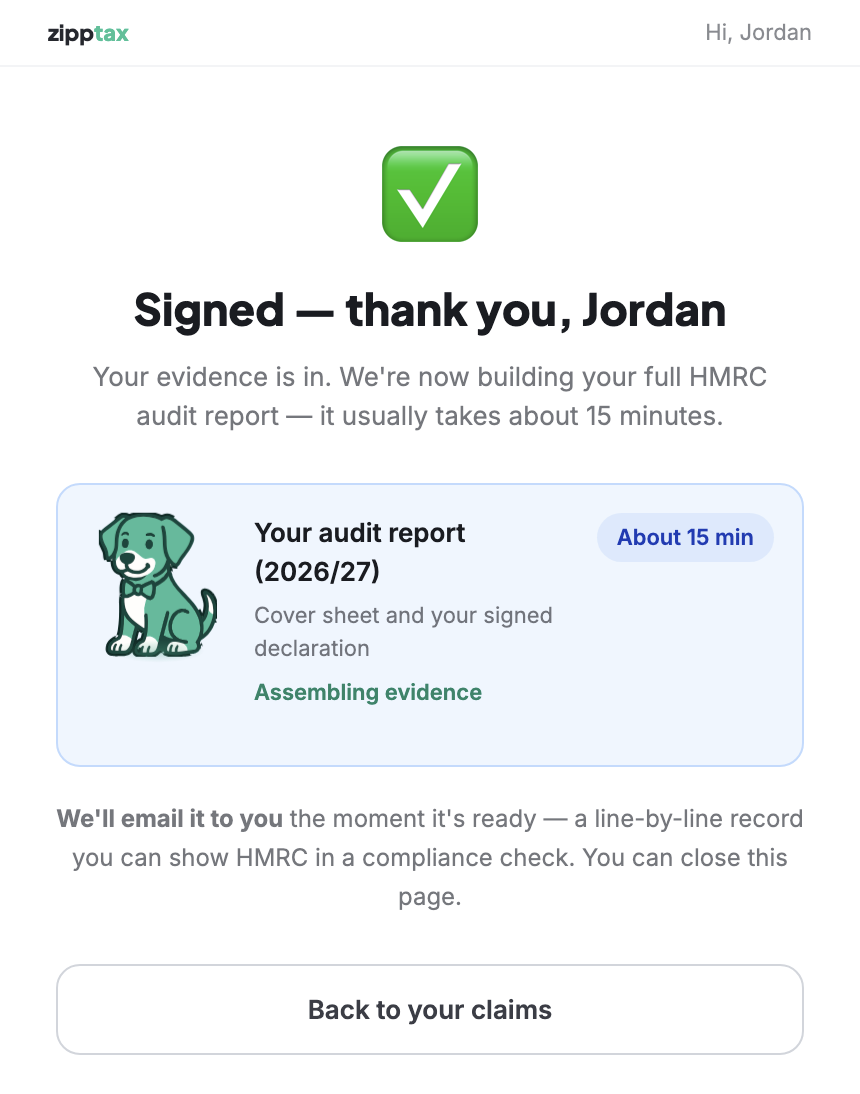
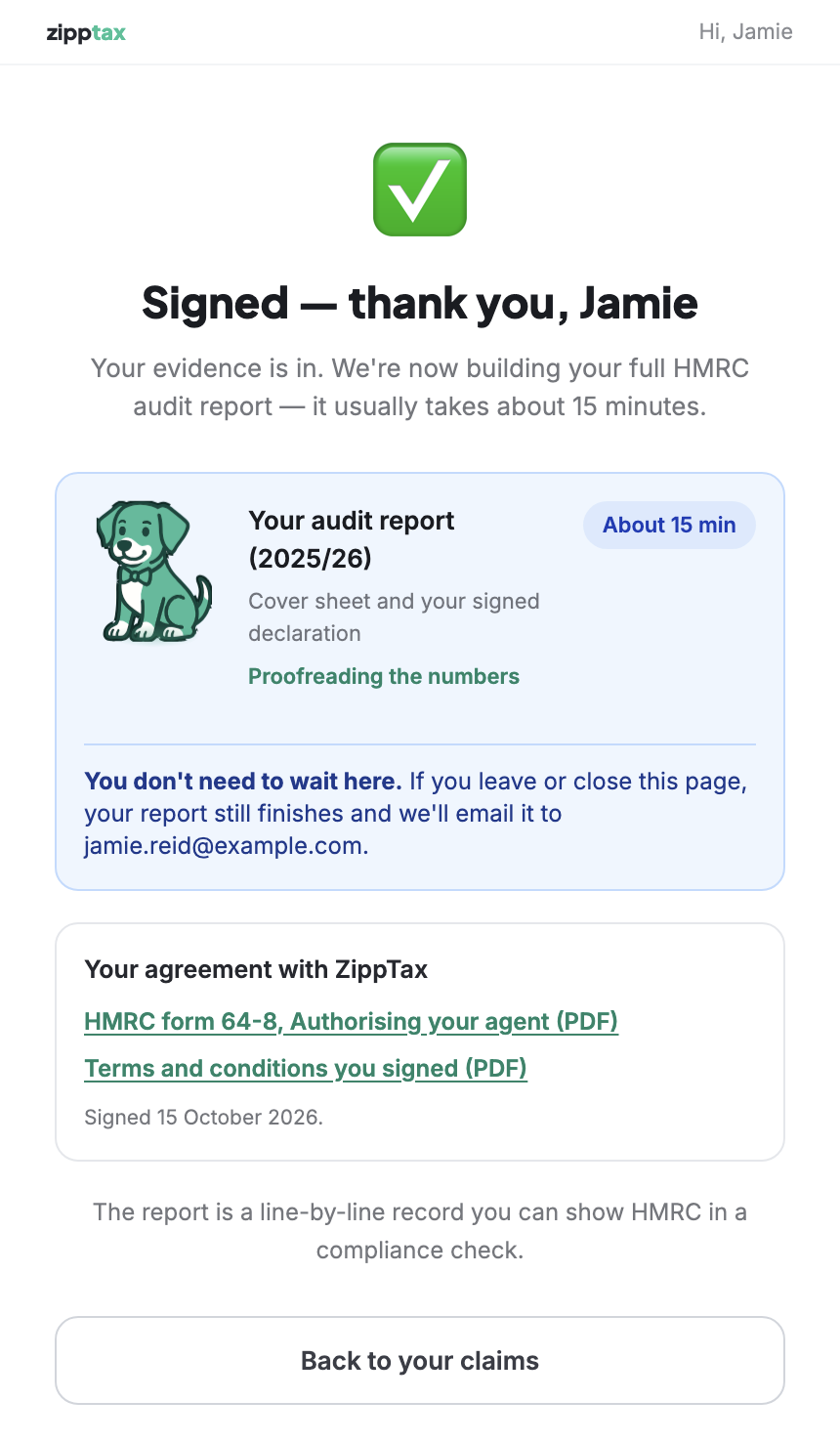
Yes: the report finishes whether or not the page stays open. The screen already said "We'll email it to you… You can close this page", but in small print under the box. The box itself now says it plainly, with the client's email address.
Before "We'll email it to you the moment it's ready… You can close this page", under the progress box.After Inside the box: "You don't need to wait here. If you leave or close this page, your report still finishes and we'll email it to" the client's address.
Schedule 1 · Point 11 of 18
Upload an existing mileage log
✕ Out of scope, by agreement
What was asked
"Place to upload mileage log if they already have one."
What was done
Nothing in this round: it was agreed to leave this out of scope. It can be scheduled as separate work. Nothing changed for the client, so there are no screenshots.
Schedule 1 · Point 12 of 18
See which salesperson each client belongs to
✓ Done
What was asked
"Way to track whose clients are whose – Portal page, clients get assigned to sales members."
What changed for staff
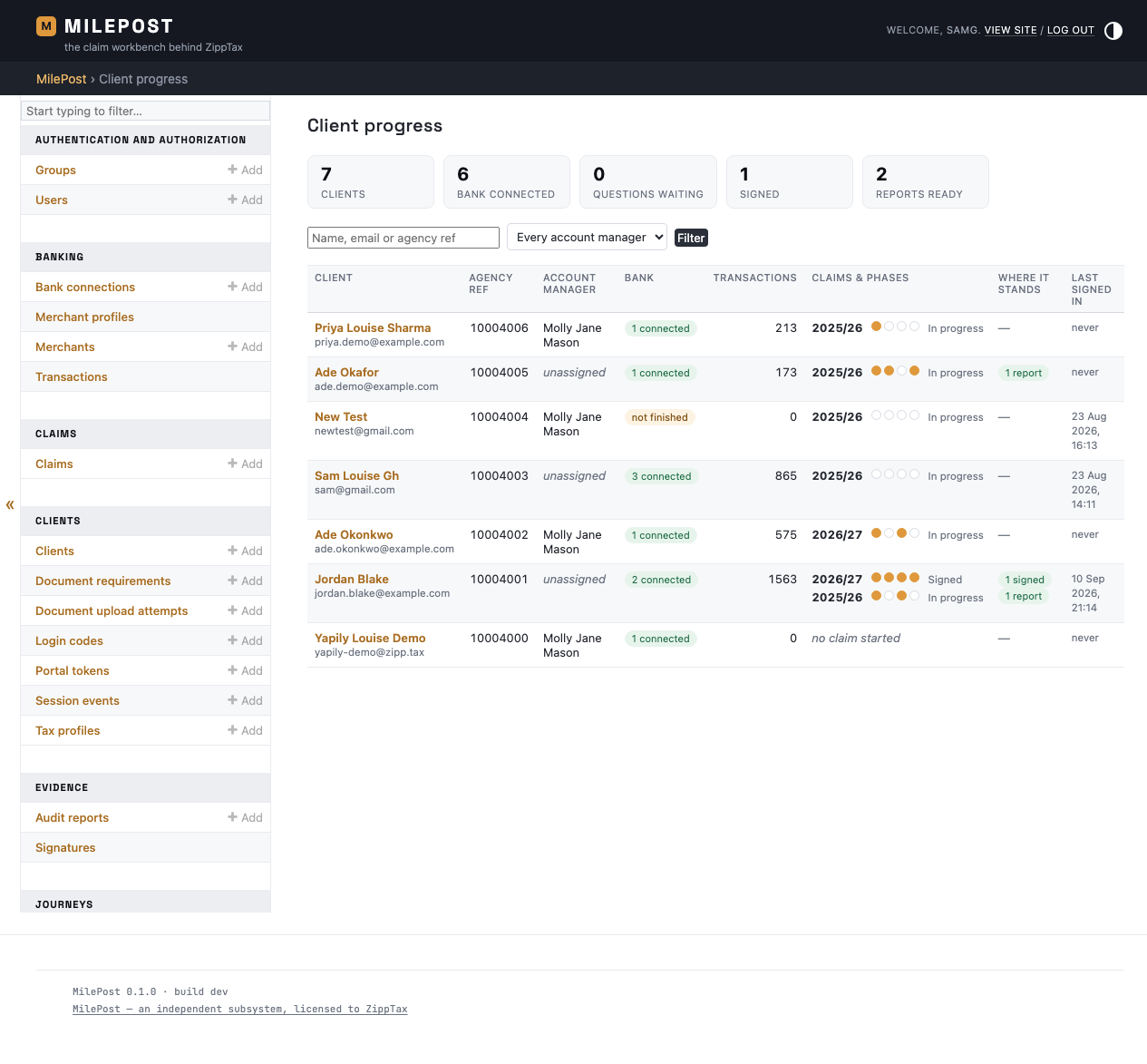
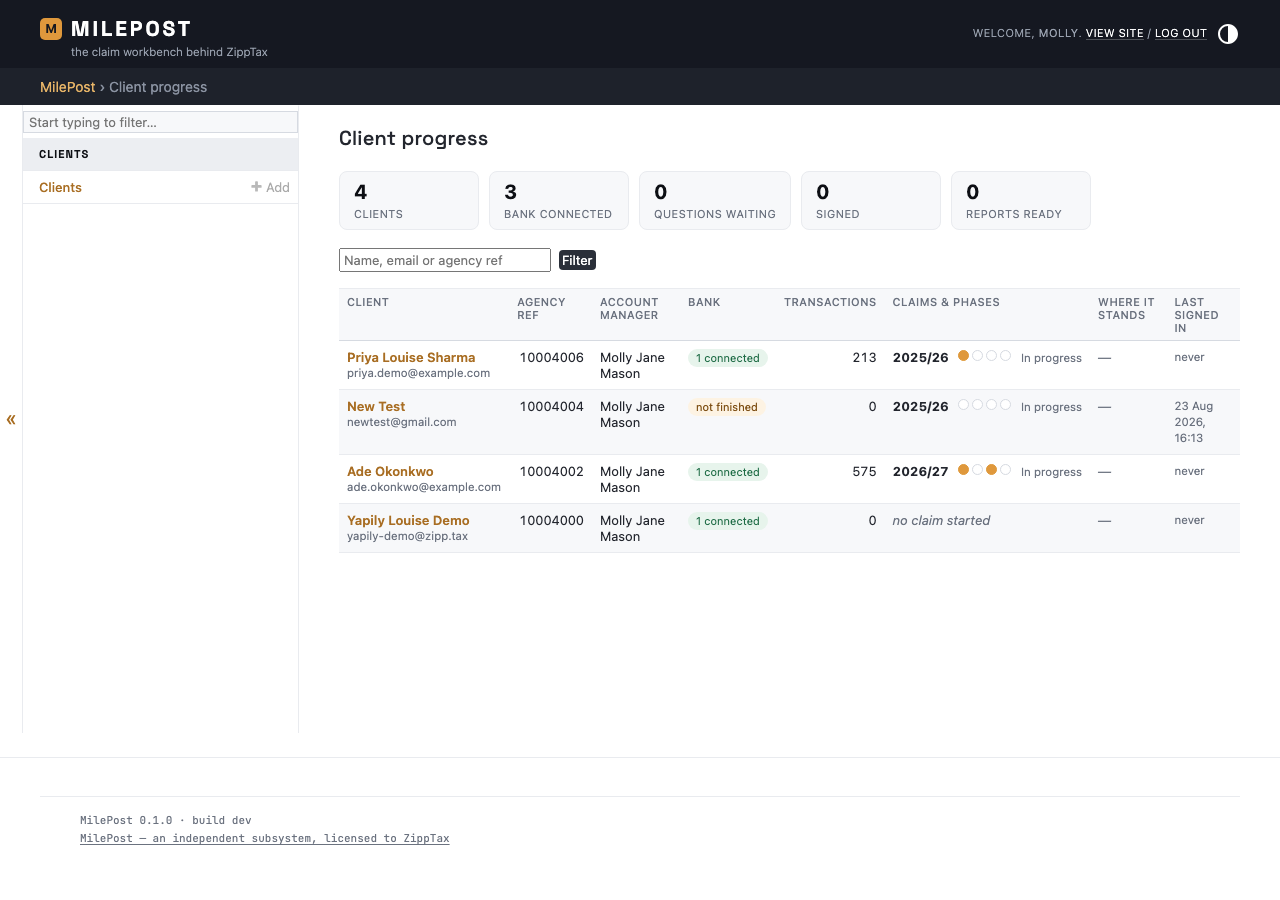
This point is about staff, so the screenshot is a staff screen; clients see no change. Every client has an account manager: the salesperson who invited them (point 5). The Client progress page in MilePost shows the account manager for each client and can be filtered to one person's clients. Salespeople now also have their own view of their clients; see section A.
Staff Client progress: look at the Account manager column, and the "Every account manager" filter above the list.
Schedule 1 · Point 13 of 18
P11D answers visible to staff and on the report
✓ Done
What was asked
"Where are the questions about P11D etc presented, as we need this for tax return but it is not showing on Audit report."
What changed
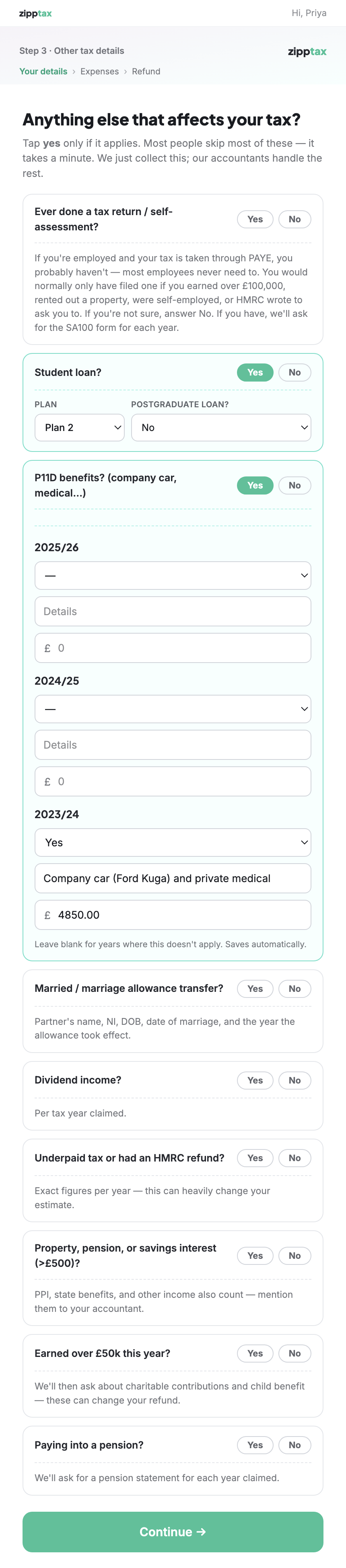
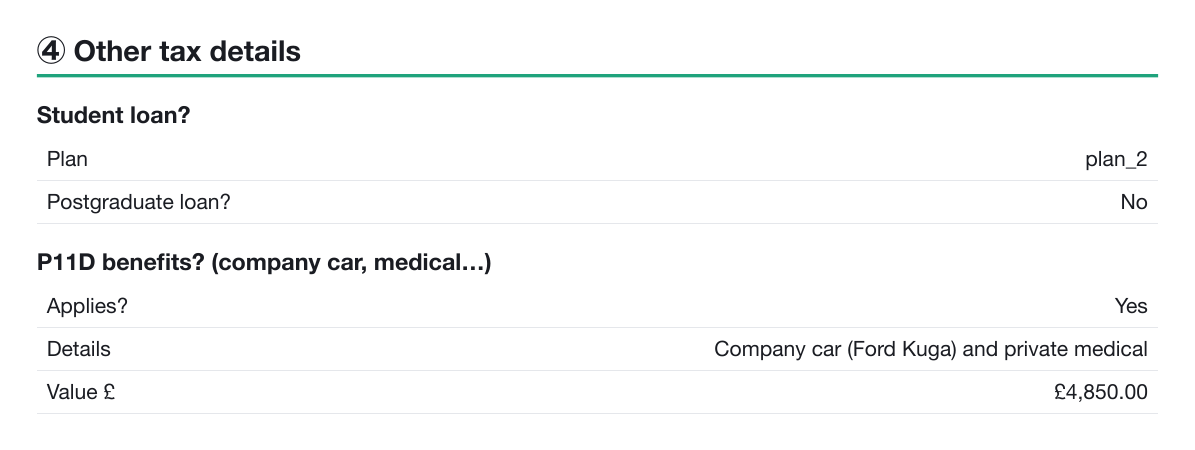
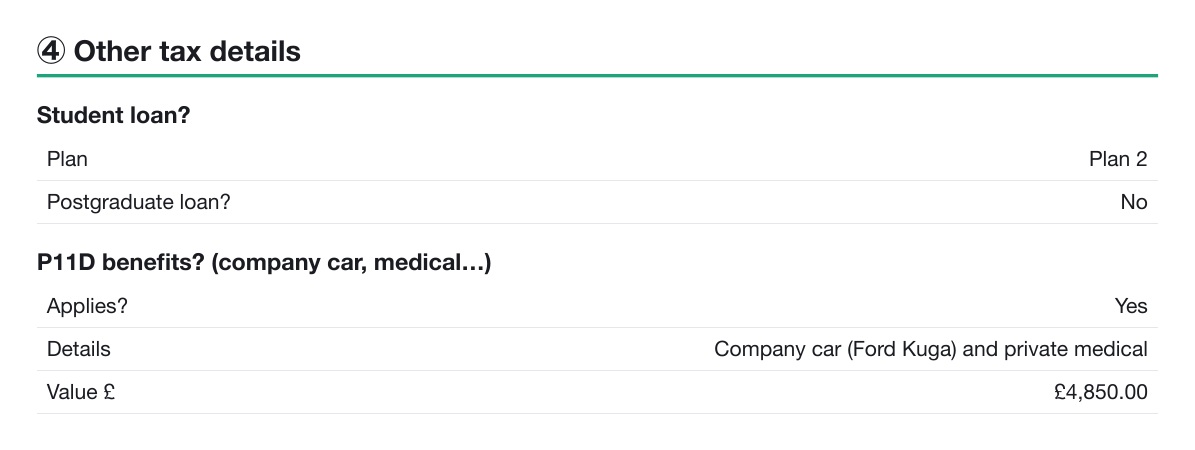
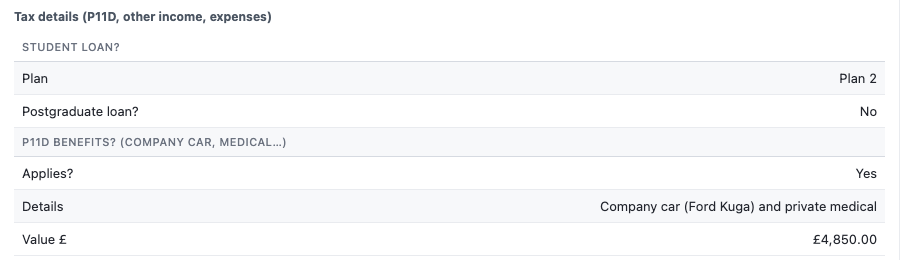
The client answers the P11D question on the "Anything else that affects your tax?" page. When we checked, the audit report already printed these answers on its "Other tax details" page whenever the client had answered Yes. What was missing was a place for staff to see them, and some answers were printed in a form only the software understood, such as "plan_2" instead of "Plan 2". Both are fixed.
What the client fills in: P11D benefits for 2023/24, "Company car (Ford Kuga) and private medical", £4,850.
Schedule 1 · Point 13 of 18 · continued
The same answers on the report, and for staff
Before The report's "Other tax details": the P11D answers are there, but the student loan plan reads "plan_2".After The same page now reads "Plan 2". P11D: Yes, the details, and £4,850.00.
Staff New: the same answers on the client's page in MilePost, so staff no longer need to open the report to see them.
Schedule 1 · Point 14 of 18
Food estimates for years without bank statements
✓ Done
What was asked
"Where we haven't got their transactions for earlier years, we need to add into their audit the lunches they've had as estimates of what they've said. For instance when we ask how much you spend on average per day and they say £6, and then how often they buy lunch on their travels, e.g. 0–100% of the time. That should then pull through into their report and, rather than state a place, it should say £6 averaged based on lunch 50% of the time."
What changed for the client
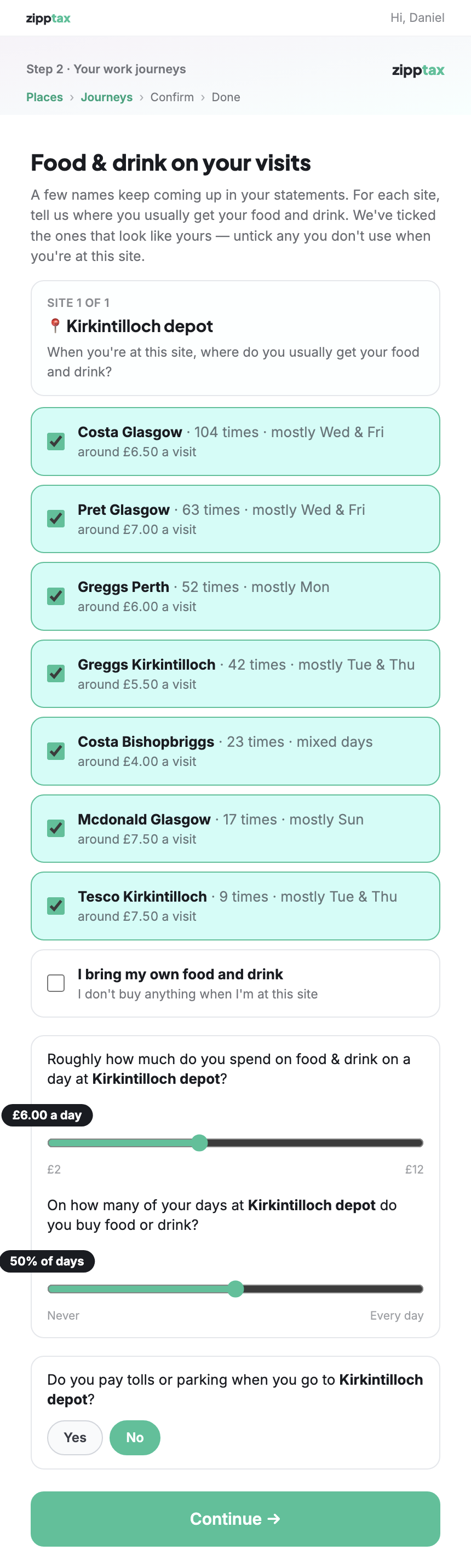
For each work site, the client already said roughly how much they spend on food and drink on a day there. They are now also asked on how many of their days there they buy it. For travel days that no bank statement covers (usually older years), the report adds an estimate from those two answers, labelled as an estimate with its basis printed. A day that a bank statement does cover is never estimated.
Before Only "how much do you spend on food & drink on a day" (£6.00).After A second slider: "On how many of your days … do you buy food or drink?" (50% of days).
Schedule 1 · Point 14 of 18 · continued
The review screen asks for a missing answer
If a year has travel days with no bank statement and the client hasn't said how often they buy food, the review screen asks them to answer, instead of guessing.
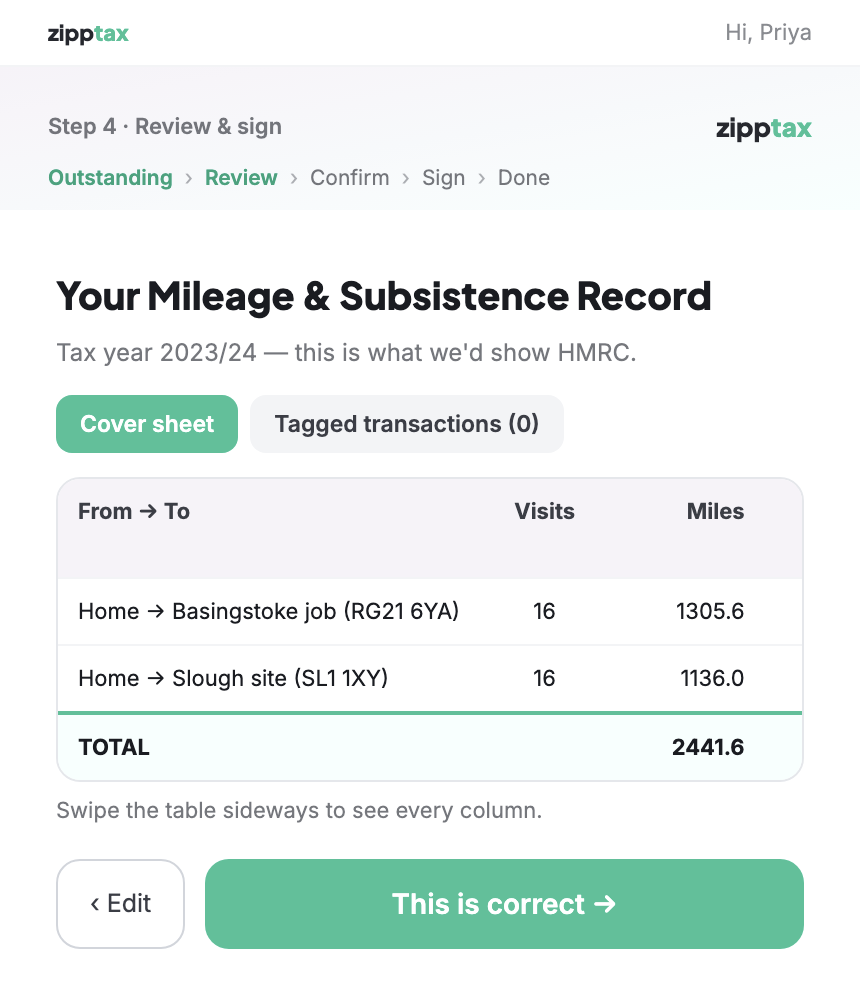
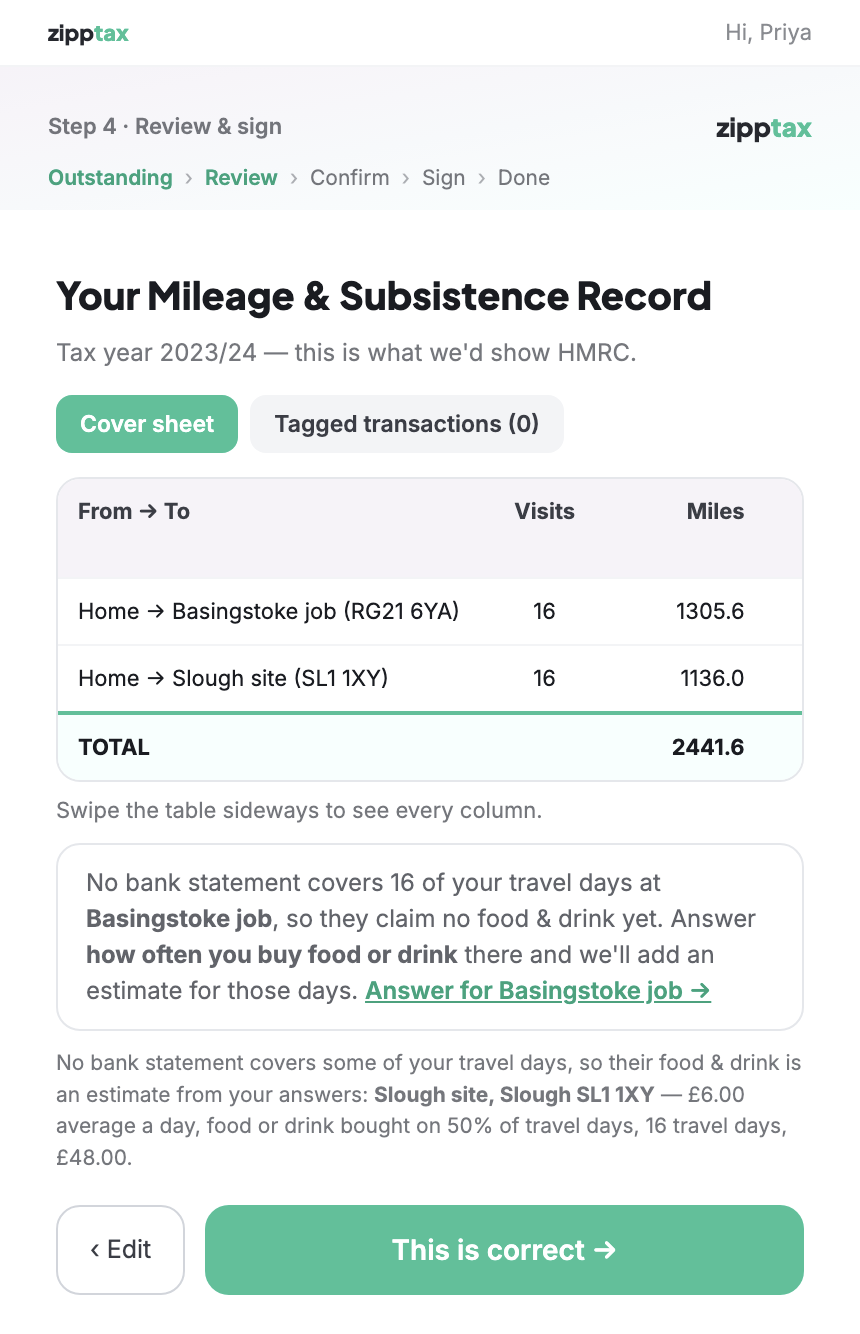
Before A 2023/24 claim with no bank statements: nothing is said about food and drink.After "No bank statement covers 16 of your travel days at Basingstoke job… Answer how often you buy food or drink there", and the estimate already made for the Slough site.
Schedule 1 · Point 14 of 18 · continued
How the estimate appears on the client's audit report
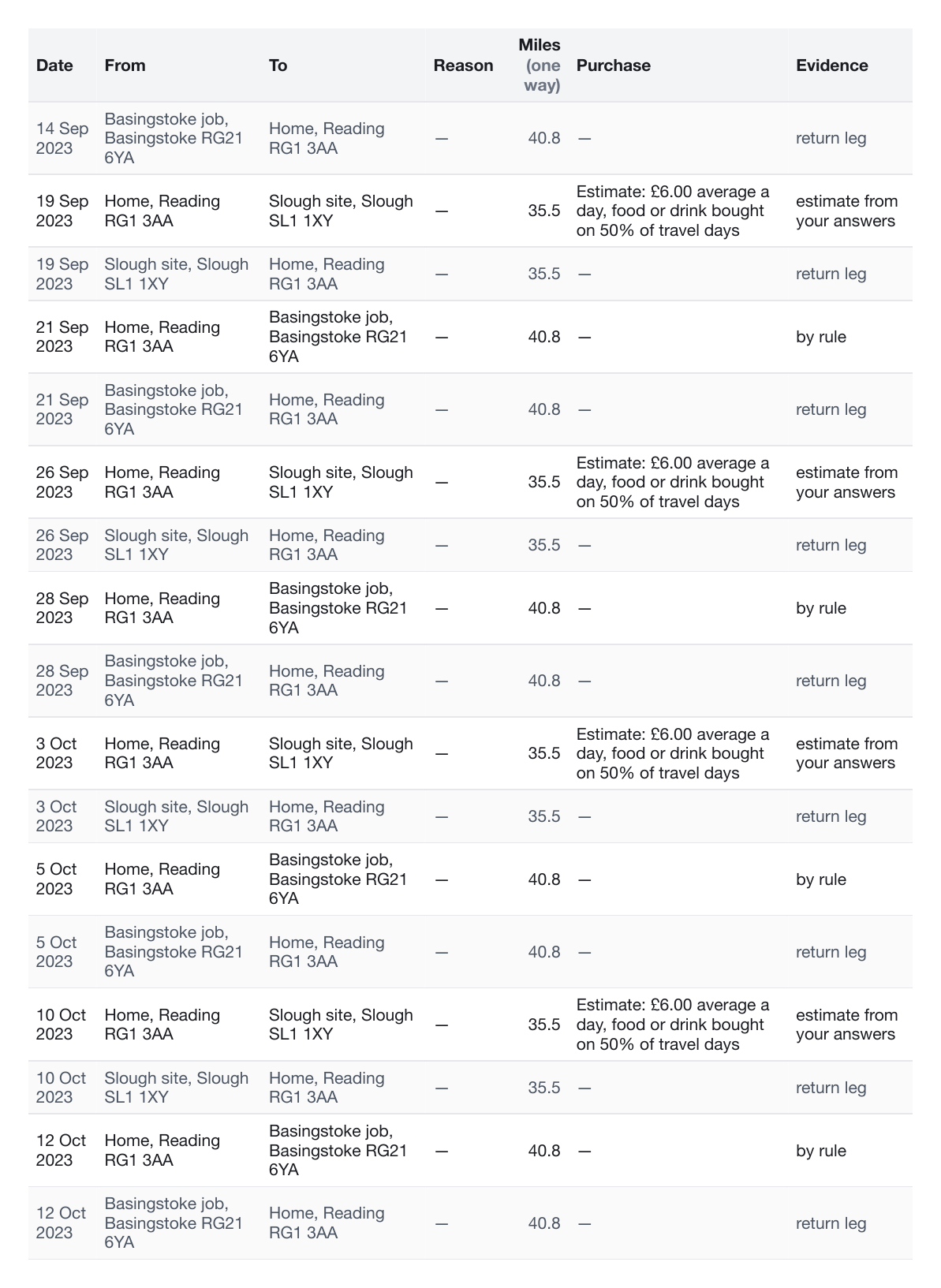
After "Subsistence estimated from your answers": "£6.00 average a day, food or drink bought on 50% of travel days", 16 travel days, £48.00. Before this change, the report had no food and drink for these days at all (see the Before report in point 9: £0.00).After In the mileage log, each estimated day shows the basis ("Estimate: £6.00 average a day … on 50% of travel days") instead of a shop name.
Schedule 1 · Point 15 of 18
HMRC Income Viewer
✕ Out of scope, by agreement
What was asked
"Link Income Viewer API."
What was done
Nothing in this round: it was agreed to leave this out of scope. Research on 24 September found that HMRC offers no supported way for software to request the client's permission for the Income Record Viewer, and HMRC's rules forbid automating the sign-in to the agent account. The write-up can be shared. Nothing changed for the client, so there are no screenshots.
Schedule 1 · Point 16 of 18
Space to upload payslips
✓ Done
What was asked
"Space to upload payslips."
What changed for the client
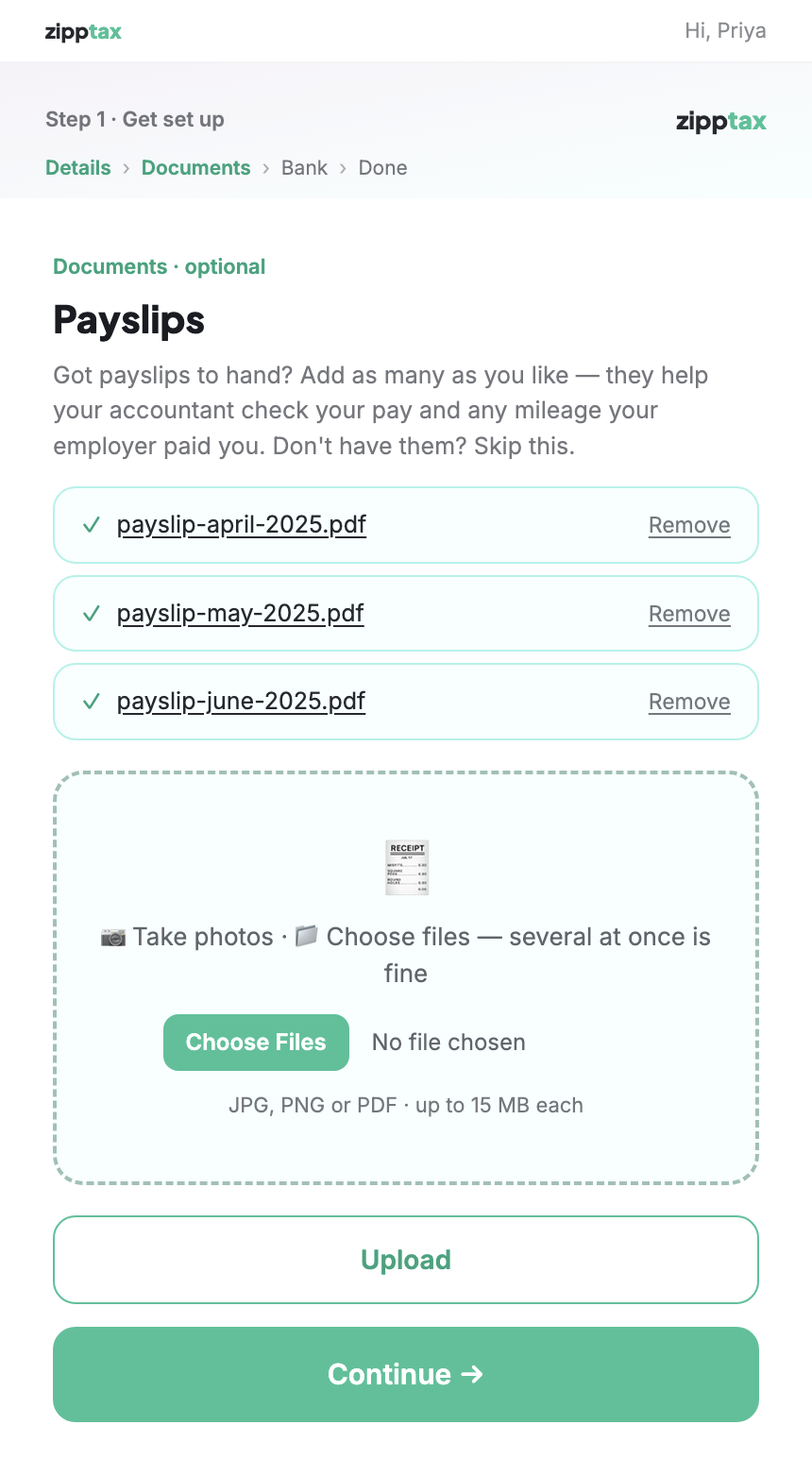
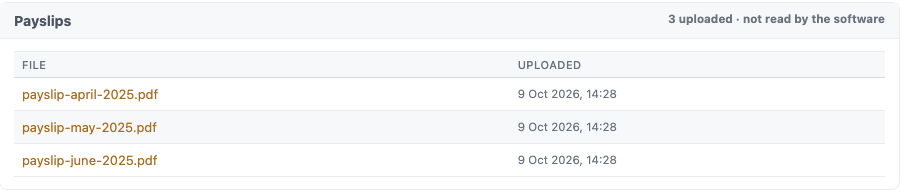
In the first step, alongside their other documents, the client can upload as many payslips as they like (photos or PDFs), or skip it. This step is new, so there is no "before" screen. As agreed, the payslips are stored for the accountants but not read automatically.
After The Payslips step, with three uploaded and a "Skip — no payslips" option.
Staff Uploaded payslips on the client's page in MilePost.
Schedule 1 · Point 17 of 18
Linking the back end
✓ Done
What was asked
"How do we link the back end?"
What changed for staff
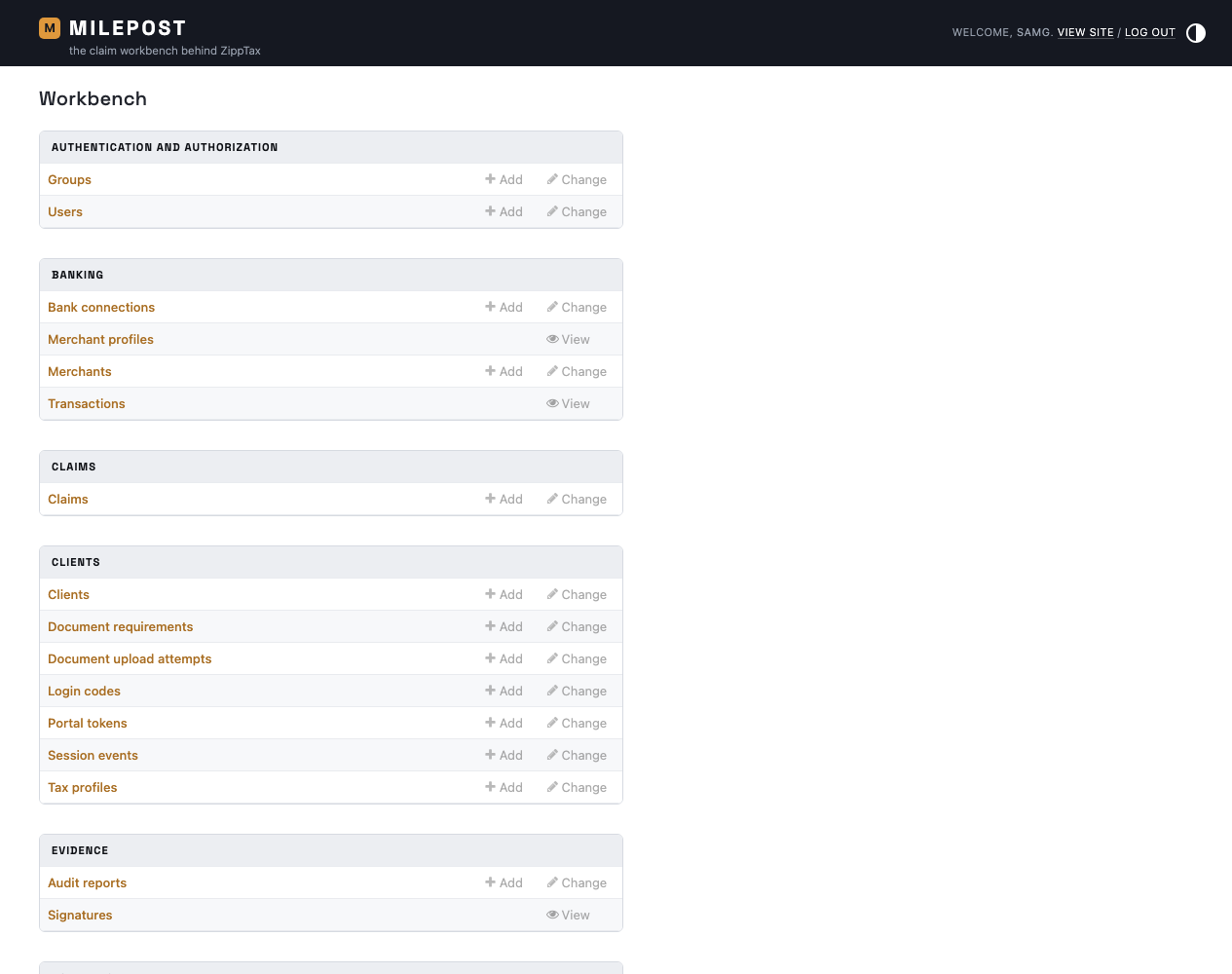
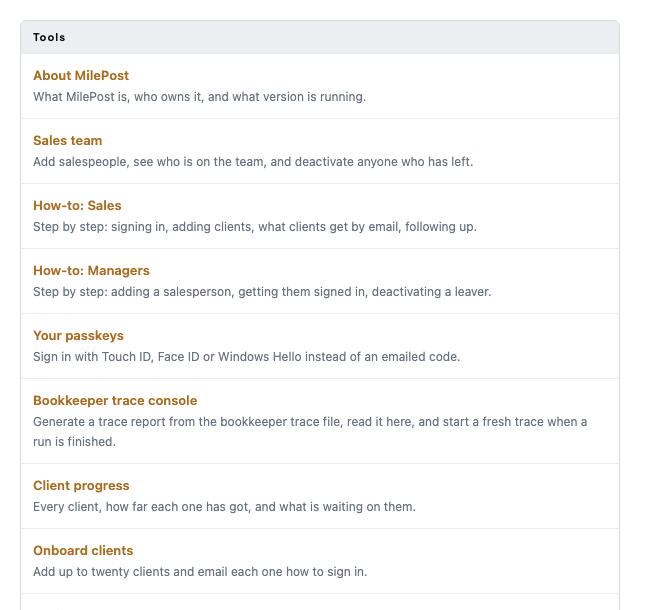
This point is about staff, so the screenshots are staff screens. The back office, called MilePost, is at portal.zipp.tax/milepost/ and works from the same client information as the client portal. Staff sign in with a code sent to their email or a passkey (Touch ID, Face ID or Windows Hello). It is live and has been in use since 3 October.
Clients never see the MilePost name: the client portal and everything sent to clients show only ZippTax.
Staff The MilePost home page, as an administrator who can see everything.Staff The tools on the same page: Sales team, how-to guides, passkeys, Client progress, Onboard clients.
Schedule 1 · Point 18 of 18
TSB bank connection
— Moved to a later round
What was asked
"Banking stuff with TSB: do we know why this wasn't working?"
What was done
Nothing yet: it was agreed to move this to a later round. Nothing changed for the client, so there are no screenshots.
New feature · A
Salespeople see their own clients' progress
✓ Done · asked for by Jim, 9 October
What was asked
Salespeople should be able to follow how far their own clients have got, without seeing other salespeople's clients.
What changed for staff
This is a staff feature; clients see no change. A salesperson can now open Client progress in MilePost. They see only the clients they invited, and can't open any other client's page. Managers and accountants still see every client.
Staff Molly, a salesperson, sees her 4 clients out of the 7 in the system.
New feature · B
The Accountants staff group
✓ Done
What was asked
A new group of staff, Accountants, who can't invite clients (unlike sales and managers) but can see the progress of every client. They should also be able to open signed reports and 64-8s, and unlock a claim.
What changed for staff
This is a staff feature; clients see no change. There is now an Accountants group in MilePost. An accountant can:
Action
Accountant
See Client progress for every client, each client's page and their mileage record
✓ Yes
Open signed audit reports, signatures, signed terms and 64-8s
✓ Yes
Unlock a signed claim (a reason is required and recorded), and lock it again
✓ Yes
Look at the list of clients and claims
✓ Yes, but can't change anything
Invite clients, or change a client's details
✕ No
See clients' sign-in codes
✕ No
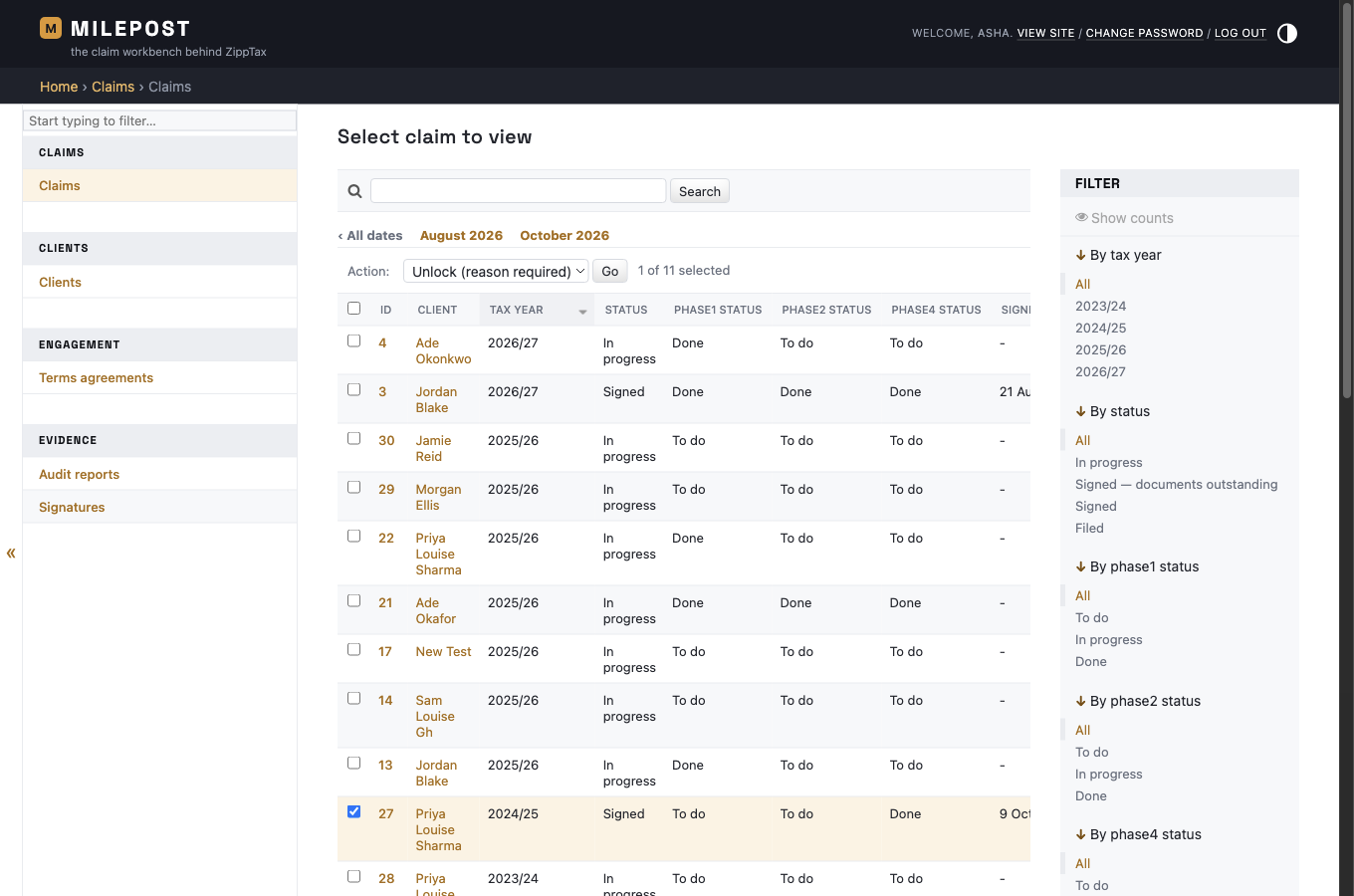
While doing this, a gap was found and closed: before, any staff member who could see the list of claims could unlock one. Unlocking is now limited to accountants and the site's owners.
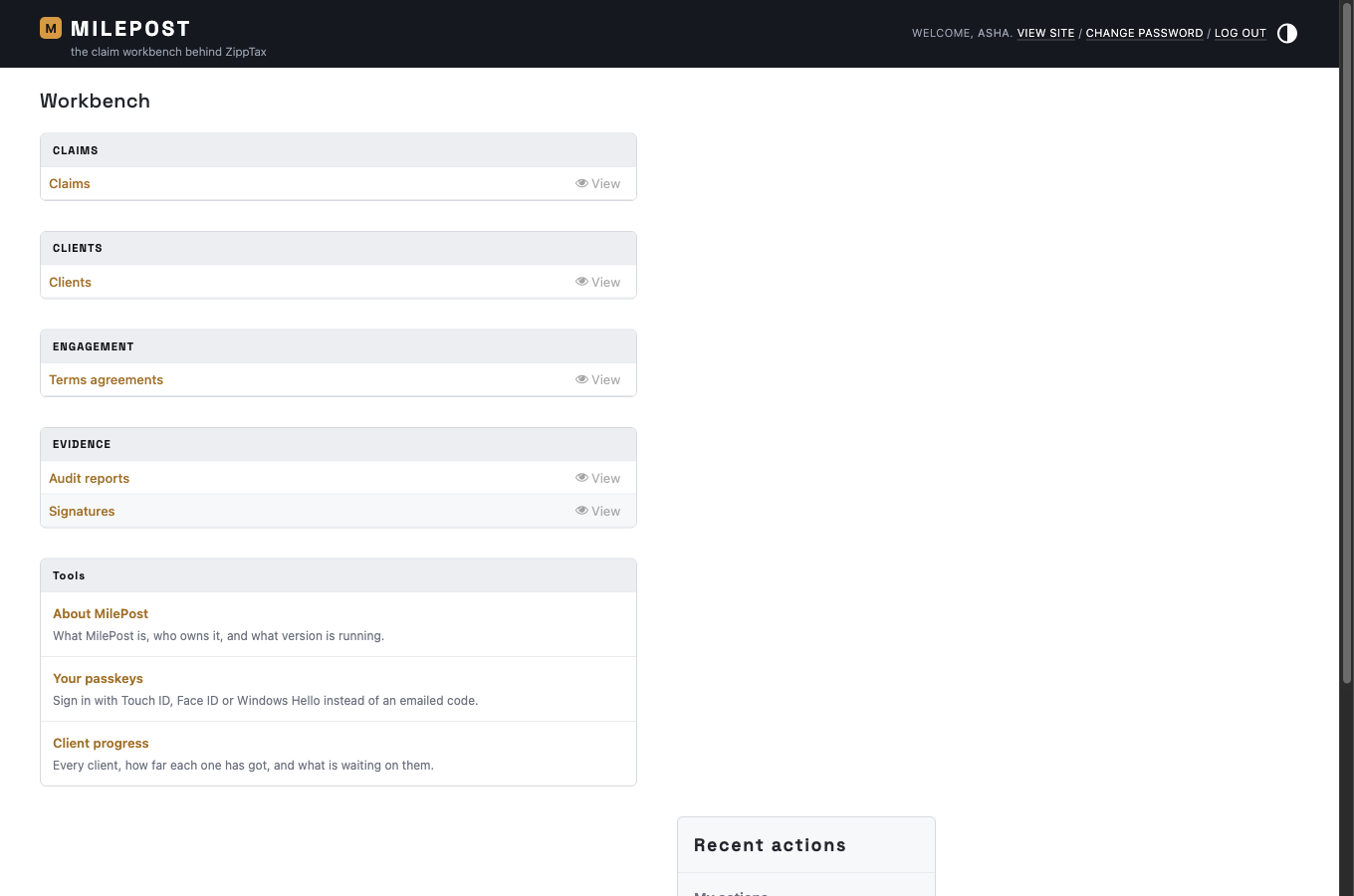
Staff MilePost as an accountant (Asha, a made-up user): claims, clients, terms, audit reports and signatures to view, plus Client progress. There is no Onboard clients tool.
New feature · B · continued
Accountants: every client, and the signed report
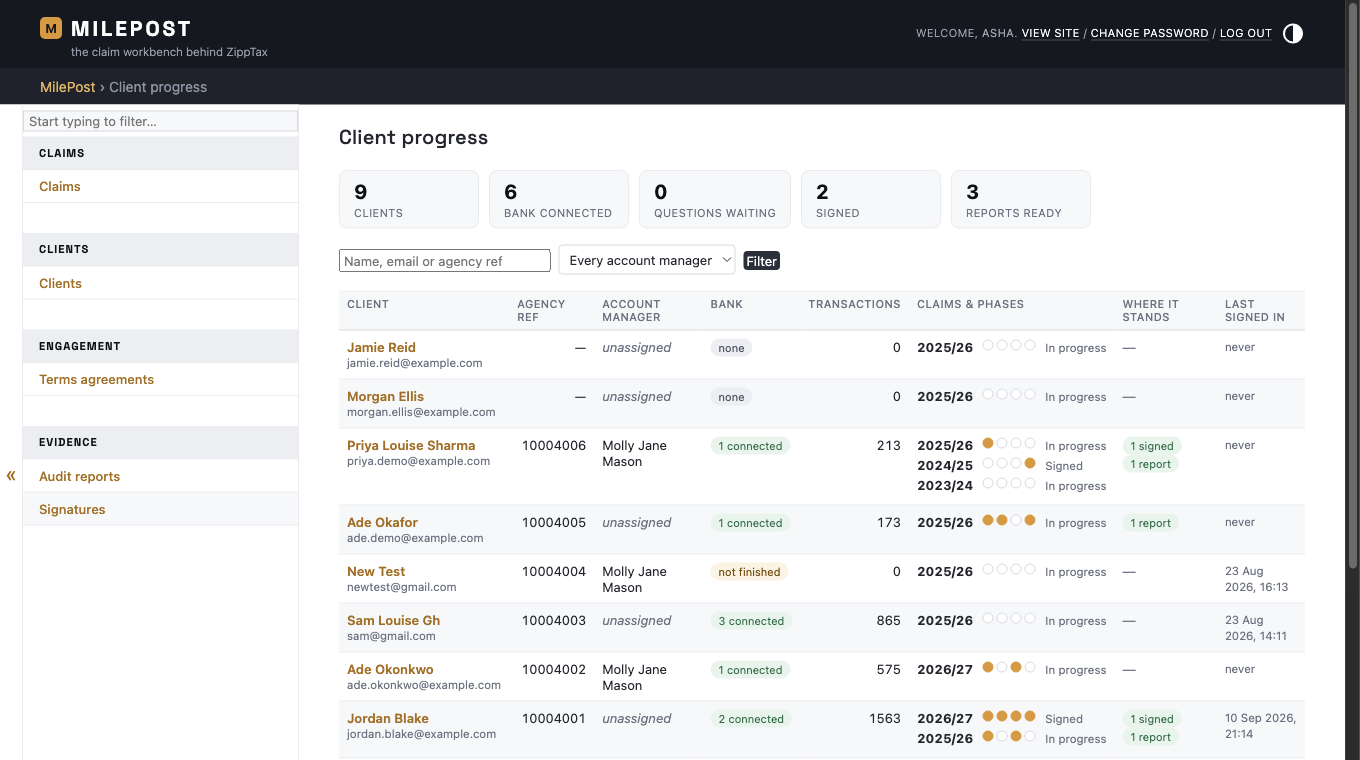
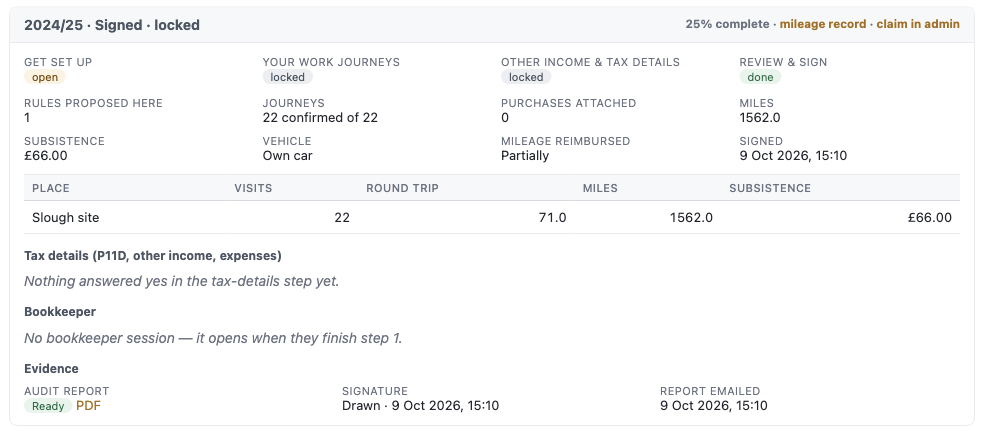
Staff Client progress as an accountant: all 9 clients, whoever their account manager is.Staff A client's signed 2024/25 claim: the audit report, the signature and the date it was emailed.
New feature · B · continued
Accountants: unlocking a claim, and the signed reports
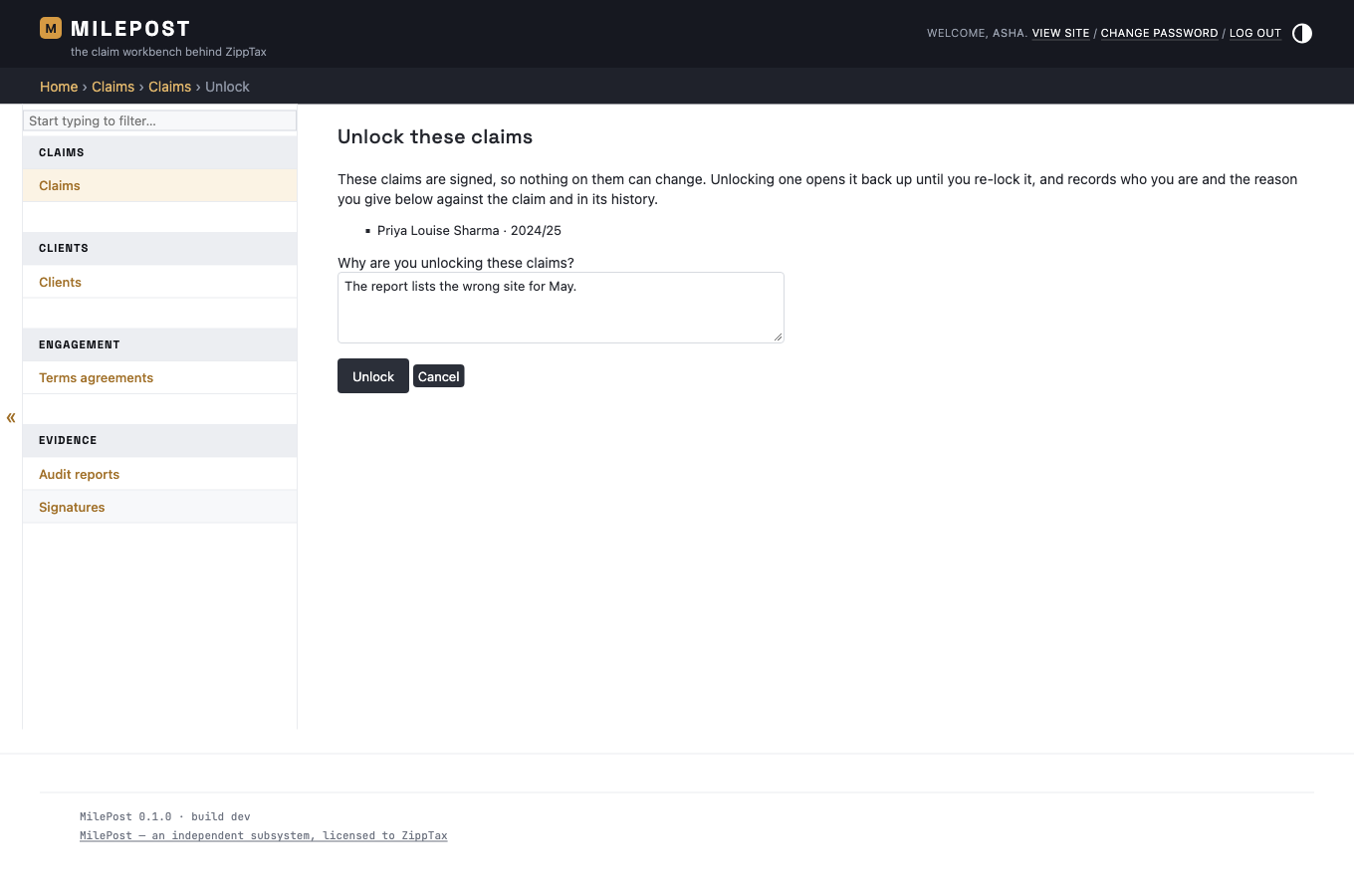
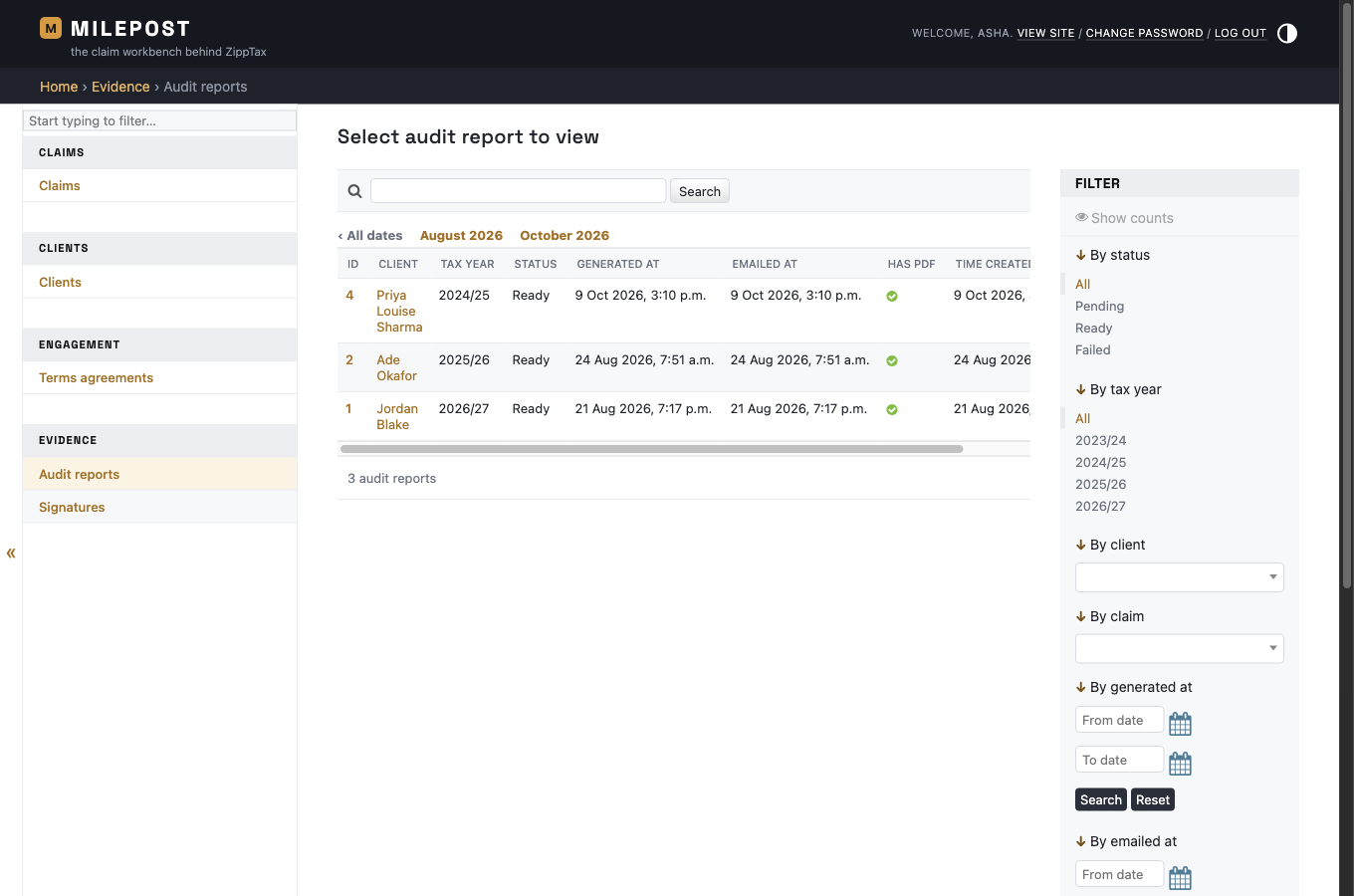
Staff The claims list: tick a signed claim and choose "Unlock (reason required)".Staff The accountant must say why. Their name and the reason are saved against the claim.Staff The list of audit reports, each with its PDF, open to accountants for viewing.
Correction from Nino · C
HMRC mileage rates: 25p after the first 10,000 miles
✓ Done
What was reported
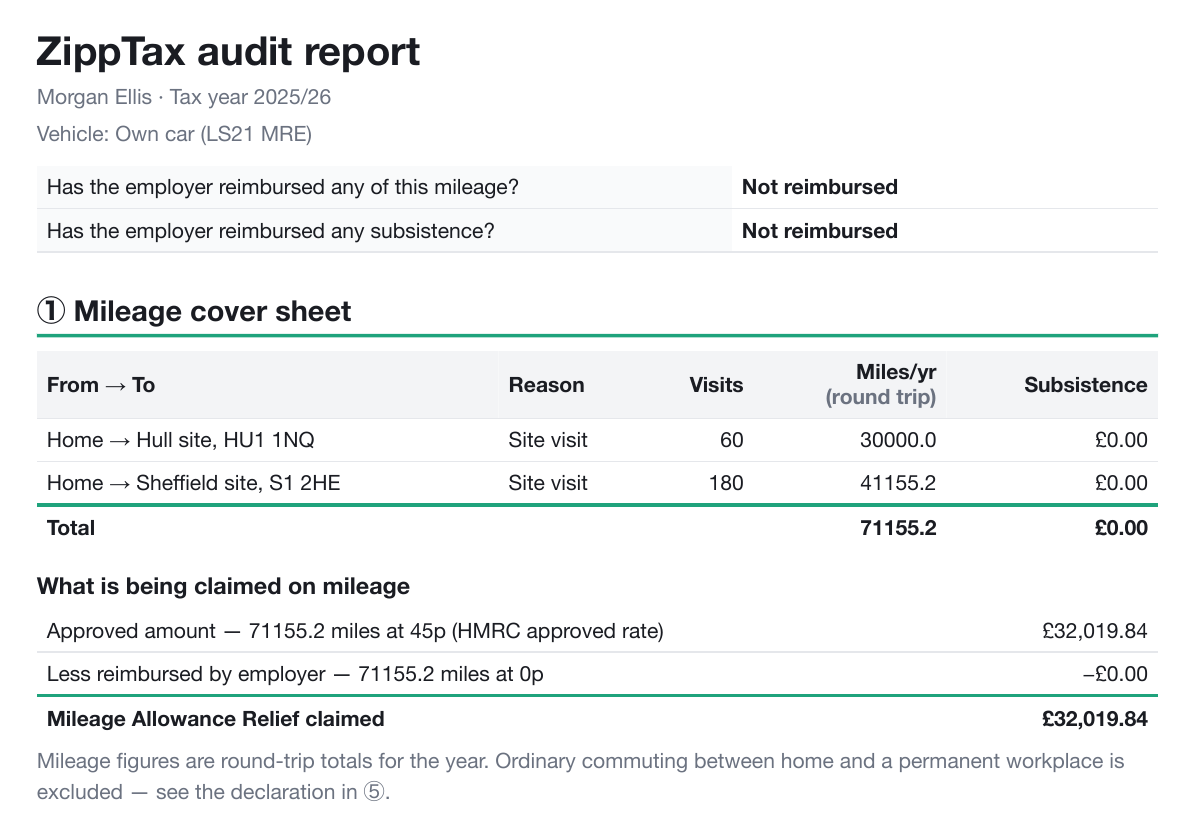
"The app currently applies 45p to all miles. It should apply 45p for the first 10,000 miles and 25p thereafter for 2024/25 and 2025/26. From 2026/27, the rate changes to 55p for the first 10,000 miles, with 25p thereafter. The report should show the calculation in two separate lines."
What changed for the client
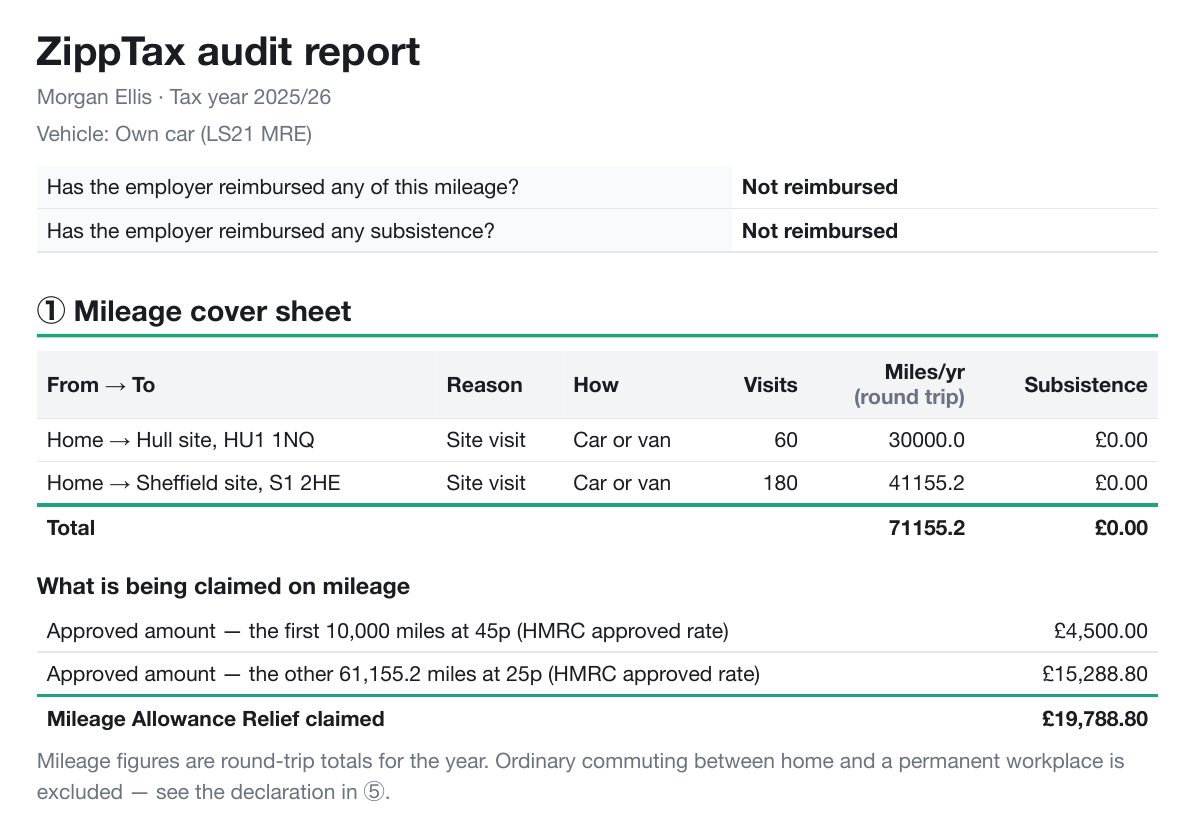
Nino was right: claims above 10,000 miles were overstated. The report now uses 45p for the first 10,000 miles of the year and 25p for every mile after that (55p and 25p from 2026/27), and shows each part on its own line. Below is a made-up client with the same 71,155.2 miles as Nino's example.
Before "71155.2 miles at 45p": £32,019.84 claimed.After "the first 10,000 miles at 45p £4,500.00" and "the other 61,155.2 miles at 25p £15,288.80": £19,788.80.
Correction from Nino · D
How the client travels to each place, and public transport fares
✓ Done
What was reported
"We should add a transport mode for each journey: car/van, motorcycle, bicycle or public transport. […] Claims should be based on the actual expenses incurred rather than mileage. Callum travelled entirely by public transport, but the app still calculated a claim for 1,271.20 miles."
What changed for the client
For each place, the client now answers "How do you get there?": car or van, motorcycle, bicycle, or public transport. Each has its own HMRC rate: car or van as in section C, motorcycle 24p a mile, bicycle 20p a mile. For public transport the client gives their usual return fare; the miles to that place are no longer claimed, and the claim is the fare times the number of visits. The likely refund (point 2) includes the fares.
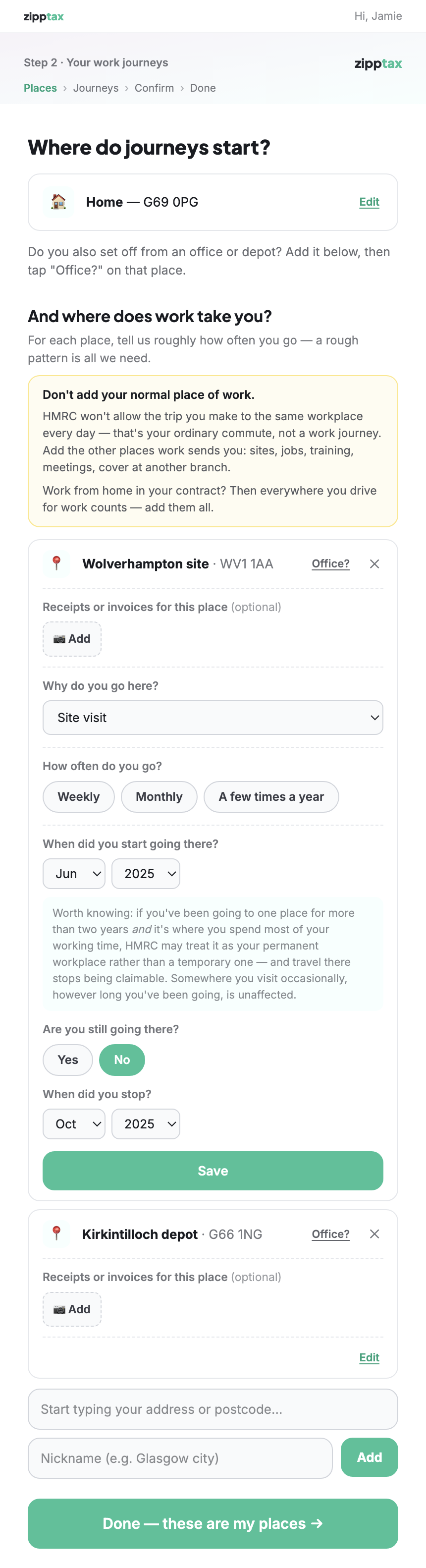
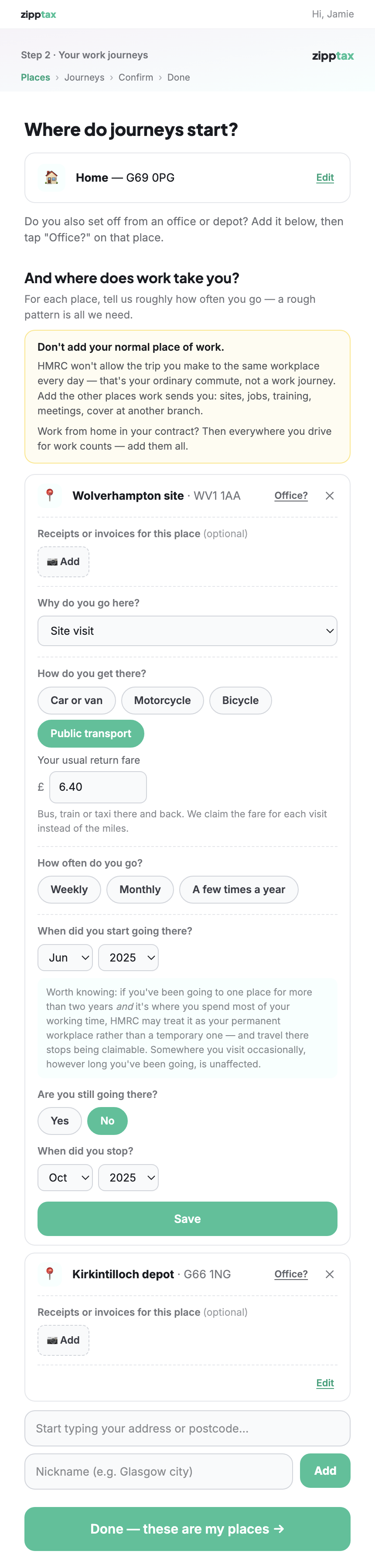
Below, a made-up client drives to a depot and takes the bus to a site in Wolverhampton.
Before The Wolverhampton site: no question about how the client gets there.After "How do you get there?" with Public transport chosen, and "Your usual return fare £6.40".
Correction from Nino · D · continued
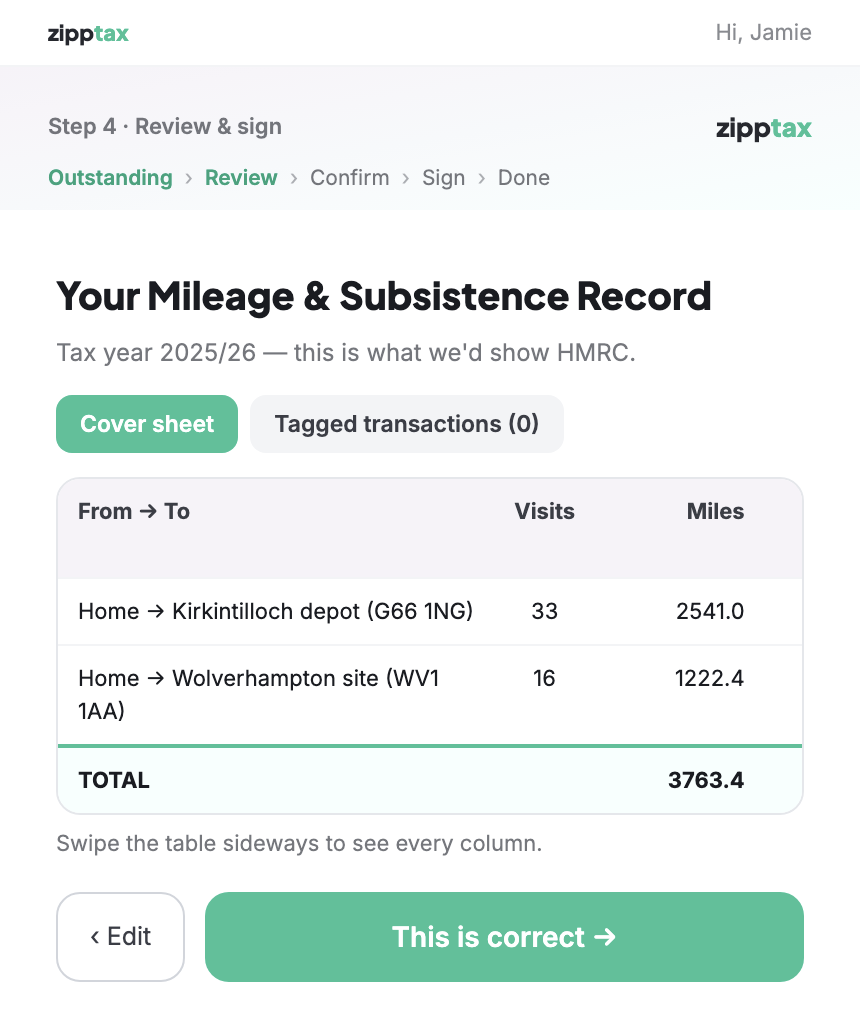
The client's review screen
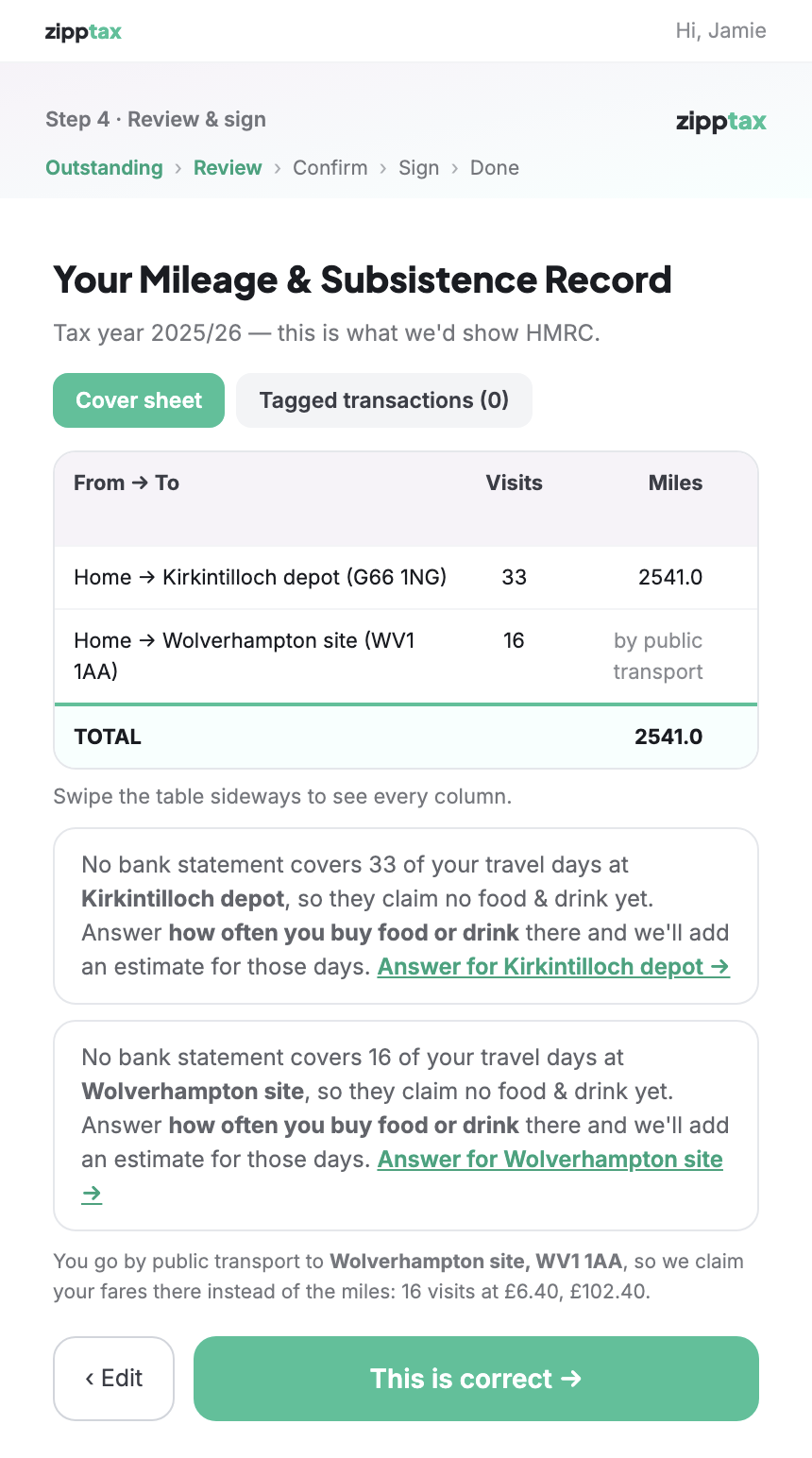
Before The 1,222.4 miles to Wolverhampton are counted: total 3,763.4 miles.After Wolverhampton shows "by public transport" instead of miles (total 2,541.0), and "we claim your fares there instead of the miles: 16 visits at £6.40, £102.40".
Correction from Nino · D · continued
The client's audit report, and the staff mileage record
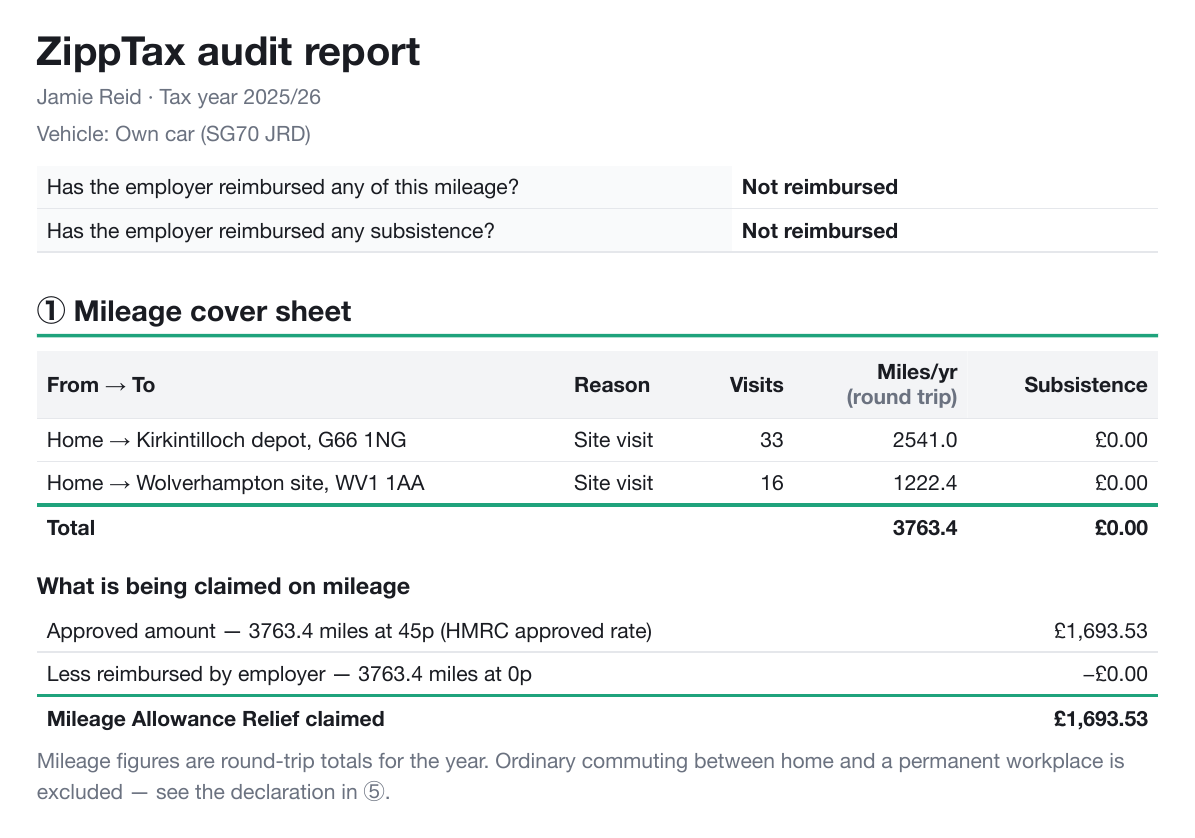
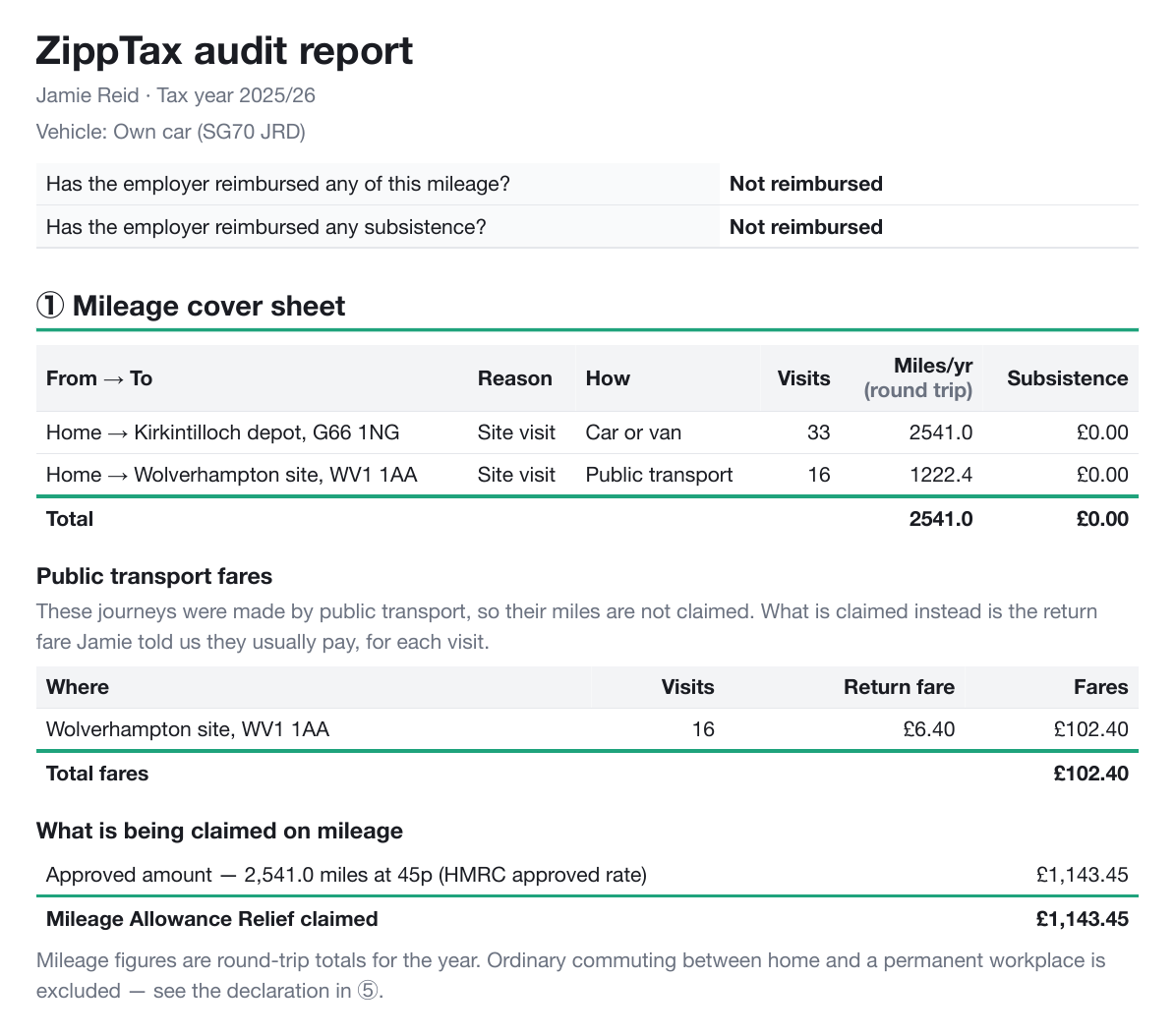
Before All 3,763.4 miles claimed at 45p: £1,693.53, including the bus journeys.After A new "How" column; 2,541.0 car miles claimed (£1,143.45); and a "Public transport fares" table: 16 visits at £6.40 = £102.40.
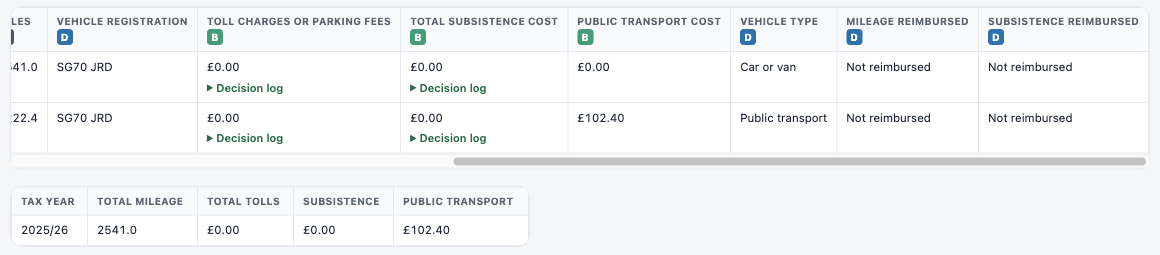
Staff The mileage record staff use: vehicle type "Public transport" and £102.40 in the public transport cost column, laid out like Nino's own spreadsheet.